
Blueberry vs Open Claw Directory

Blueberry
Blueberry is the all-in-one workspace for AI-driven web app development and delivery.
Last updated: February 27, 2026

Last updated: February 28, 2026
Visual Comparison
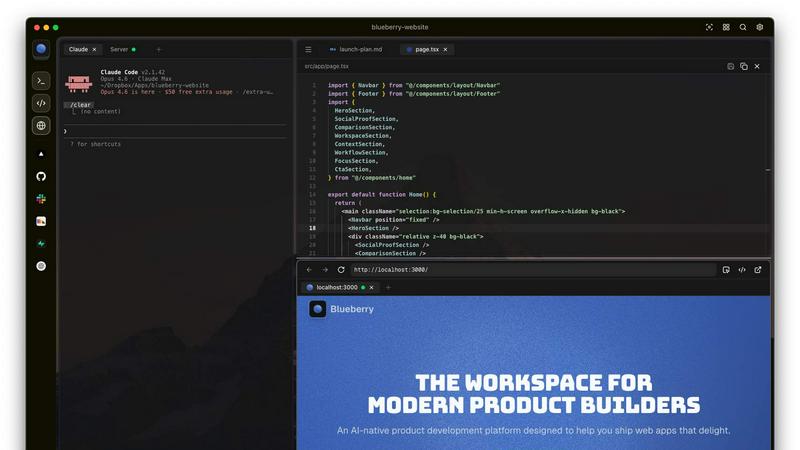
Blueberry
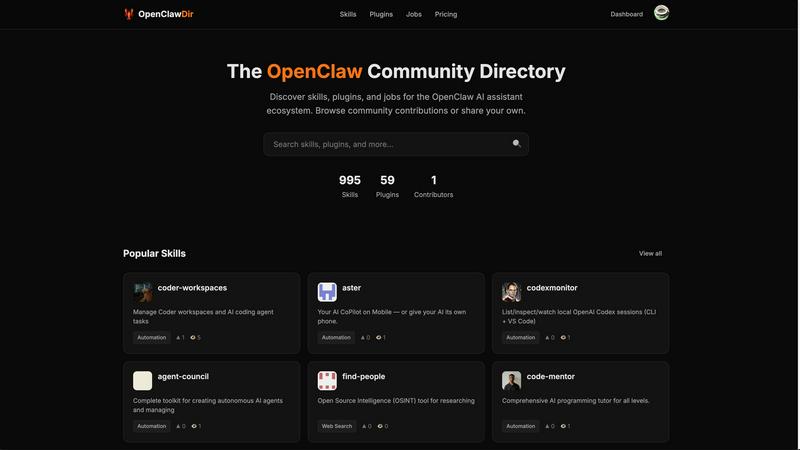
Open Claw Directory
Feature Comparison
Blueberry
Integrated Workspace
Blueberry combines a terminal, code editor, and preview browser into a single workspace, eliminating the need to switch between applications. This integration enables a fluid workflow where all your tools are accessible in one place, enhancing productivity and focus.
Contextual AI Interaction
With Blueberry's built-in MCP server, your AI can interact with the entire workspace. It has full context of your code, browser, and running apps, allowing it to provide intelligent suggestions and insights based on your current project state.
Pinned Apps
Keep essential tools like GitHub, Linear, Figma, and PostHog docked inside your Blueberry workspace. These pinned apps load alongside your project, sharing live context with your AI and providing a cohesive development experience without interruptions.
Screenshot & Element Selection
Blueberry allows you to capture screenshots or select elements directly from the preview browser, giving your AI visual context. This feature enhances the ability to provide feedback and suggestions based on actual interface elements, making development more intuitive.
Open Claw Directory
Comprehensive Resource Listings
Open Claw Directory offers an extensive collection of skills and plugins for OpenClaw, making it simple for users to find exactly what they need. With over 3,000 skills and nearly 600 plugins, users can explore various categories, ensuring they have access to the latest and most relevant tools for their AI projects.
Community Contribution and Engagement
This platform thrives on community involvement, allowing developers to submit their own tools and job listings. Contributors can share their innovations and engage with other users, fostering a collaborative environment where ideas flourish and new solutions are born.
User-Friendly Browsing Experience
The directory is designed to enhance user experience with intuitive navigation. Users can easily filter resources by categories, popularity, or recent additions, making it effortless to discover new skills and plugins that can enhance their OpenClaw assistant’s capabilities.
Featured and Trending Resources
Open Claw Directory highlights popular skills and plugins, ensuring users can quickly access the most sought-after resources. Featured listings help guide users towards high-quality tools and new contributions that have gained traction in the community.
Use Cases
Blueberry
Collaborative Development
Teams can use Blueberry to streamline collaboration by keeping all project files, discussions, and design tools in one integrated workspace. This fosters real-time communication and reduces the time spent switching between different applications.
Rapid Prototyping
Developers can quickly prototype web applications using Blueberry's live preview feature. As you code, you can instantly see changes reflected in the browser, allowing for faster iterations and a more efficient development cycle.
Enhanced Debugging
With a terminal that provides live output and context-aware AI support, debugging becomes a more manageable task. Blueberry helps identify issues in real-time, enabling developers to fix bugs faster and improve overall code quality.
Educational Tool for Developers
Blueberry serves as an excellent educational platform for new developers. By providing integrated tools and contextual AI support, learners can receive immediate assistance while coding, making the learning process more engaging and effective.
Open Claw Directory
Enhancing Personal Productivity
Individuals can leverage the skills and plugins available in the directory to automate tasks and streamline workflows. For example, utilizing AI-driven tools for scheduling or reminders can significantly boost daily productivity, making life easier and more organized.
Empowering Developers
Developers can use the Open Claw Directory to find advanced tools and plugins that enhance their projects. By integrating community-contributed resources, developers can build more sophisticated AI applications and share their work with others in the directory.
Job Opportunities for AI Enthusiasts
The directory serves as a valuable resource for job seekers within the AI field. Users can browse job listings specifically related to OpenClaw, connecting them with potential employers looking for talent in the rapidly growing AI sector.
Experimenting with New Technologies
Tech enthusiasts and hobbyists can explore new skills and plugins to experiment with AI functionalities. The directory provides a playground for users to test the latest innovations and create unique applications, encouraging creativity and exploration in AI development.
Overview
About Blueberry
Blueberry is a revolutionary macOS application designed for modern product builders, seamlessly integrating your code editor, terminal, and browser into one focused workspace. Gone are the days of juggling multiple windows and losing context; Blueberry allows developers to focus on what truly matters—building exceptional web applications. With its AI-native capabilities, Blueberry connects to powerful models such as Claude, Codex, and Gemini via its built-in MCP server. This means your AI can see your files, understand terminal output, and provide live previews, all while you work. It's tailored for developers, designers, and product managers who want to streamline their workflow and enhance productivity. Experience the future of development with Blueberry, where your tools work together in harmony to help you ship web apps that delight users.
About Open Claw Directory
Open Claw Directory is a vibrant, community-driven platform dedicated to the OpenClaw AI assistant ecosystem. It acts as a centralized hub where users can discover a rich array of skills, plugins, and job opportunities tailored to OpenClaw, an innovative open-source AI agent that can run locally and integrates seamlessly with various messaging platforms. This directory not only showcases popular extensions and new contributions but also categorizes skills to facilitate easy navigation. Developers and community contributors are empowered to share their tools and job listings, fostering collaboration and innovation within the OpenClaw community. With thousands of skills and plugins available, users are equipped to enhance their AI assistant experience, whether for personal projects or professional applications.
Frequently Asked Questions
Blueberry FAQ
What is Blueberry?
Blueberry is a macOS application that integrates your code editor, terminal, and browser into one workspace, enhancing productivity for modern product builders.
How does Blueberry improve workflow?
By combining essential development tools into a single workspace, Blueberry minimizes the need to switch between applications, allowing developers to focus more on coding and less on managing multiple windows.
Is Blueberry suitable for team collaboration?
Absolutely! Blueberry's integrated workspace and pinned apps facilitate effective collaboration among team members, ensuring everyone has access to the same tools and context.
When will Blueberry be available after the beta period?
While specific details about the post-beta period are not yet available, Blueberry is currently 100% free during its beta phase, allowing users to explore its features without any financial commitment.
Open Claw Directory FAQ
What is Open Claw Directory?
Open Claw Directory is a community-driven site that lists resources, skills, and plugins for the OpenClaw AI assistant ecosystem, allowing users to enhance their AI experience.
How can I contribute to Open Claw Directory?
Users can contribute by submitting their own skills, plugins, or job listings through the platform, fostering collaboration and sharing within the community.
Are the resources in Open Claw Directory free to use?
Yes, many of the skills and plugins available in the directory are open-source and free to use, promoting accessibility and innovation within the AI community.
How can I find specific skills or plugins for OpenClaw?
You can browse the directory by categories or use the search functionality to find specific skills or plugins tailored to your needs, making resource discovery easy and efficient.
Alternatives
Blueberry Alternatives
Blueberry is a cutting-edge macOS application designed to streamline the product building process by integrating your editor, terminal, and browser into a single focused workspace. This innovative tool falls within the Dev Tools category, catering to developers and creators looking to enhance their workflow and productivity. Users often seek alternatives to Blueberry for various reasons, such as exploring more competitive pricing, discovering additional features, or finding solutions that better align with their specific platform needs. When searching for an alternative to Blueberry, it’s essential to consider several factors, including the ease of integration with your current tools, the range of features offered, and the overall user experience. Look for options that enhance your workflow without adding unnecessary complexity, ensuring that you can maintain your focus and productivity just like you would with Blueberry.
Open Claw Directory Alternatives
Open Claw Directory is a vibrant community directory that focuses on the OpenClaw AI assistant ecosystem. It serves as a resource hub where users can discover skills, plugins, and job listings tailored for the OpenClaw platform, an innovative open-source AI agent designed for local deployment and integration with messaging platforms. This directory is pivotal for developers and users alike, as it showcases popular extensions and new contributions, while also facilitating community engagement through tool and job submissions. Users often seek alternatives to the Open Claw Directory due to a variety of reasons, such as pricing structures, feature sets, or specific platform compatibility needs. In the fast-paced world of technology, users may find themselves looking for solutions that offer enhanced functionality, better user experiences, or unique integrations that better fit their requirements. When choosing an alternative, it's essential to consider factors like usability, community support, available resources, and the breadth of features that align with your goals and projects.