
PrecisionWrite vs Video to Text

PrecisionWrite
PrecisionWrite is your AI co-editor for effortless rewriting, ensuring clarity, style, and tone in every text.
Last updated: February 28, 2026

Video to Text
Transform any video or audio into accurate, clean text quickly and effortlessly with our advanced AI transcription tool.
Last updated: April 13, 2026
Visual Comparison
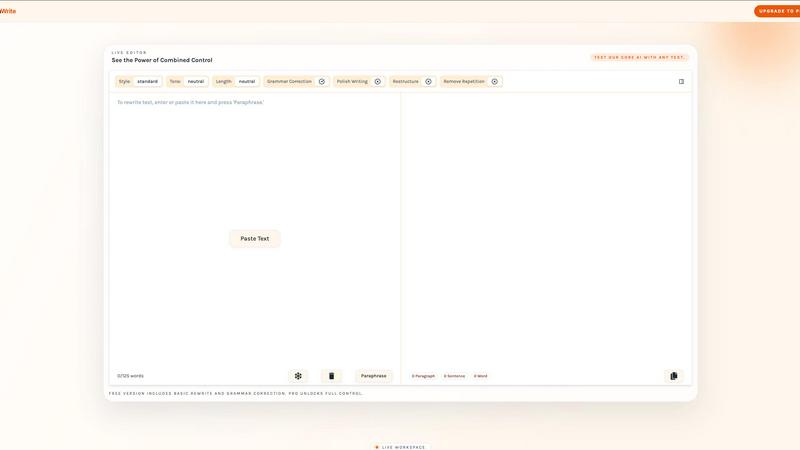
PrecisionWrite
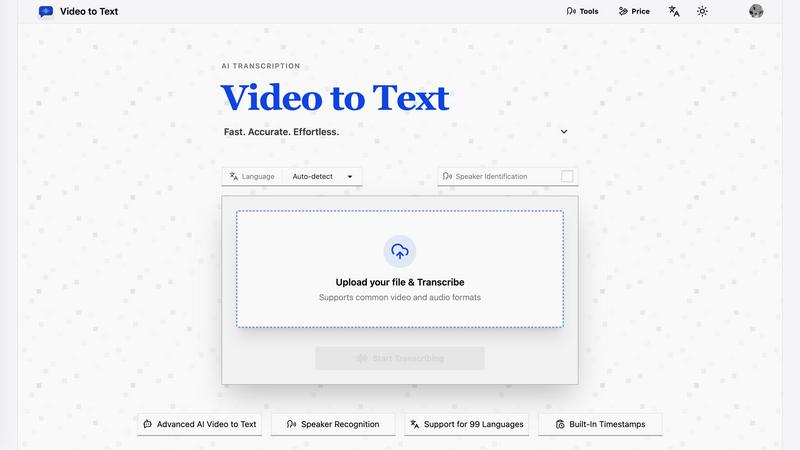
Video to Text
Feature Comparison
PrecisionWrite
Multidimensional Control
PrecisionWrite offers users the power to rewrite text with unparalleled versatility. Choose from 8+ writing styles and adjust the tone to match your audience perfectly. This feature ensures that your text not only reads well but resonates with the intended audience.
Freeze Function
The unique Freeze function allows you to protect key terms or phrases while the AI rewrites the surrounding text. This ensures that brand names, technical jargon, or critical phrases remain intact, providing you with peace of mind during the editing process.
Length Control
With PrecisionWrite, you can actively modify the length of your text as part of the rewriting process. Whether you require a concise summary or a more detailed version, this feature allows you to adjust the text's length without needing additional steps.
The Deep Polish Engine
PrecisionWrite's Pro engine goes beyond simple rewriting. It restructures sentences, eliminates repetitive phrases, and enhances overall flow, ensuring your text achieves a native-level fluency that is polished and professional.
Video to Text
Fast and Accurate Transcription
Video to Text utilizes advanced AI technology to deliver high-accuracy transcriptions for both video and audio files. Users can expect quick turnaround times, allowing them to access their transcribed content almost instantly, making it an ideal choice for time-sensitive projects.
Multi-Language Support
This service supports 99 languages, featuring automatic language detection and recognition for mixed-language recordings. This expansive language capability ensures that users from diverse linguistic backgrounds can easily transcribe their content without any hassle.
Speaker Identification
With built-in speaker diarization, Video to Text can accurately identify and separate different speakers within the audio or video files. This feature enhances clarity in transcripts, making it easier for users to follow conversations, particularly in interviews, meetings, and webinars.
Flexible Export Options
Users can export their transcripts in various formats, including TXT, SRT, VTT, and CSV. These options cater to different needs, whether for simple text documents, subtitle integration, or structured data analysis, ensuring compatibility with various workflows.
Use Cases
PrecisionWrite
Professional Communication
PrecisionWrite is perfect for business professionals looking to enhance their communication. Whether rewriting emails to sound more confident or paraphrasing reports into concise executive summaries, the tool helps ensure that your message is clear and impactful.
Academic Writing
Students and academics can benefit significantly from PrecisionWrite. It aids in rephrasing research papers to avoid plagiarism, simplifying complex paragraphs for better understanding, and rewriting essay drafts to meet formal academic standards.
Content Creation
For content creators, PrecisionWrite is a game-changer. It refreshes old blog posts with new phrasing, generates multiple versions of social media captions, and adapts content for various platforms, making it easier to connect with diverse audiences.
Overcoming Writer's Block
Writer's block can be a significant hurdle for many. PrecisionWrite helps overcome this by providing creative sentence rewrites, enabling users to explore alternative phrasings and ideas, ultimately inspiring fresh content.
Video to Text
Creating Subtitles for Videos
Content creators can use Video to Text to generate accurate subtitles for YouTube videos, online courses, and social media clips. This feature enhances accessibility, making content more engaging and inclusive for viewers.
Transcribing Meetings and Webinars
Professionals can turn meetings, webinars, and calls into searchable notes quickly and efficiently. By capturing spoken content, teams can ensure that important discussions are documented and easily referable for future use.
Interview Transcriptions for Research
Journalists and researchers can transcribe interviews seamlessly, making it easier to analyze and quote sources in their work. With high accuracy and quick turnaround, this tool accelerates the research process.
Language Learning Support
Students and language learners can benefit from transcribing audio lessons and language practice materials. By providing written transcripts, Video to Text enhances comprehension and allows for easier review and study.
Overview
About PrecisionWrite
PrecisionWrite is an advanced AI-powered tool designed to enhance your writing experience by offering intelligent paraphrasing and rewriting capabilities. It serves as your trusted co-editor, empowering users from various backgrounds—be it students, professionals, or content creators—to communicate effectively and confidently in English. The primary value proposition of PrecisionWrite lies in its ability to go beyond mere synonym replacement; it comprehensively understands context and intention, allowing for tailored rewrites that maintain the essence of the original text while improving clarity and engagement. Whether you're crafting an email, refining a report, or generating content for social media, PrecisionWrite adapts to your specific needs, making it an invaluable resource for anyone looking to elevate their writing quality.
About Video to Text
Video to Text is an innovative AI-powered transcription service that transforms video and audio files into clean, exportable text with remarkable speed and accuracy. Tailored for content creators, teams, and individuals, this platform eliminates the need for complex transcription setups, allowing users to focus on their core activities. Its streamlined upload process, combined with automated processing and speaker-aware transcription, makes it exceptionally user-friendly. Whether you are a filmmaker needing subtitles, a student looking to convert lectures into notes, or a professional capturing meeting notes, Video to Text offers a seamless solution. With support for 99 languages and various export formats, it caters to a global audience, ensuring that everyone can benefit from fast, reliable speech-to-text conversion.
Frequently Asked Questions
PrecisionWrite FAQ
How does PrecisionWrite improve my writing?
PrecisionWrite enhances your writing by offering intelligent paraphrasing that understands context. It helps you choose the right style and tone while maintaining the core message of your original text.
Can I use PrecisionWrite for academic purposes?
Absolutely! PrecisionWrite is designed for academics and students, providing tools to rephrase research, simplify complex concepts, and ensure that written assignments meet high academic standards.
What makes PrecisionWrite different from other paraphrasing tools?
Unlike basic paraphrasing tools that merely swap out synonyms, PrecisionWrite rewrites with intent, offering multidimensional controls for style, tone, and length while preserving the meaning of your text.
Is there a free version of PrecisionWrite?
Yes, PrecisionWrite offers a free version that includes basic rewriting and grammar correction features. For advanced tools and full control, users can upgrade to PrecisionWrite Pro.
Video to Text FAQ
What is Video to Text?
Video to Text is an AI transcription tool that converts video and audio files into text, subtitles, and structured formats. It offers fast and accurate transcription services tailored for various users, from creators to professionals.
How does the transcription process work?
The process is simple: users upload their video or audio file, the AI transcribes the content, and then users can export the transcript in their preferred format. This efficient workflow minimizes hassle and maximizes productivity.
What file formats does Video to Text support?
Video to Text supports a wide range of audio and video formats, including MP4, MOV, MKV, WEBM, MP3, WAV, and more. This flexibility ensures that users can upload most common media files without any issues.
Are there any limitations on transcription minutes?
New users receive 30 free transcription minutes to start exploring the service. After that, users can choose from various pay-as-you-go pricing options based on their needs, ensuring they only pay for what they use.
Alternatives
PrecisionWrite Alternatives
PrecisionWrite is an AI-powered precision editing tool designed to assist users in paraphrasing and rewriting English text with exceptional control. As part of the AI Assistants category, it elevates your writing by understanding context, making it more than just a basic synonym replacement tool. Users often seek alternatives to PrecisionWrite due to various factors, including pricing, specific feature sets, or the need for compatibility with different platforms. When choosing an alternative, consider the range of features offered, the flexibility in editing styles, and whether the tool can cater to your unique writing needs. A good alternative should empower you to enhance your communication effectively.
Video to Text Alternatives
Video to Text is an innovative, AI-powered transcription service that quickly converts video and audio files into clean, exportable text. It belongs to the AI Assistants category and is tailored for creators, teams, and individuals who seek speed and accuracy in speech-to-text conversion without the hassle of building their own transcription pipelines. Users often search for alternatives due to various reasons such as pricing, feature sets, or specific platform requirements. When choosing an alternative, consider factors like transcription accuracy, ease of use, export options, and whether the service meets your specific workflow needs. Finding the right fit can enhance your productivity and streamline your content creation process.