
ProcessBankStatement vs Tailride

ProcessBankStatement
Convert your PDF bank statements to clean CSVs in seconds with ProcessBankStatement—fast, secure, and hassle-free data extraction.
Last updated: March 11, 2026

Tailride
Tailride automates your invoice chaos by scanning emails and portals with AI.
Last updated: February 28, 2026
Visual Comparison
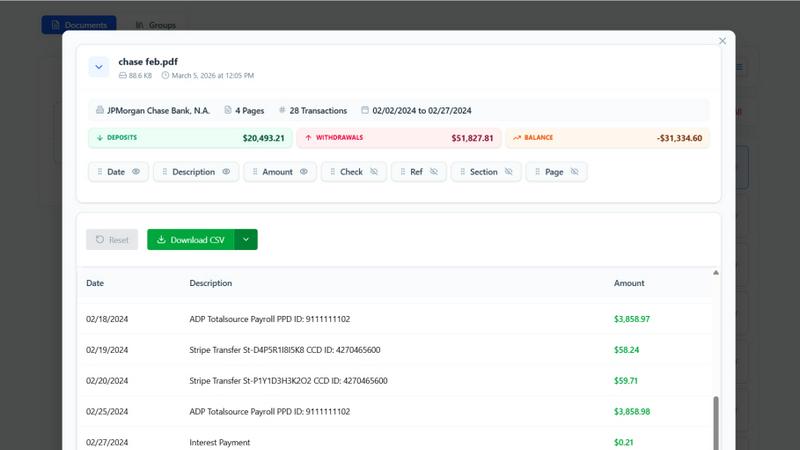
ProcessBankStatement
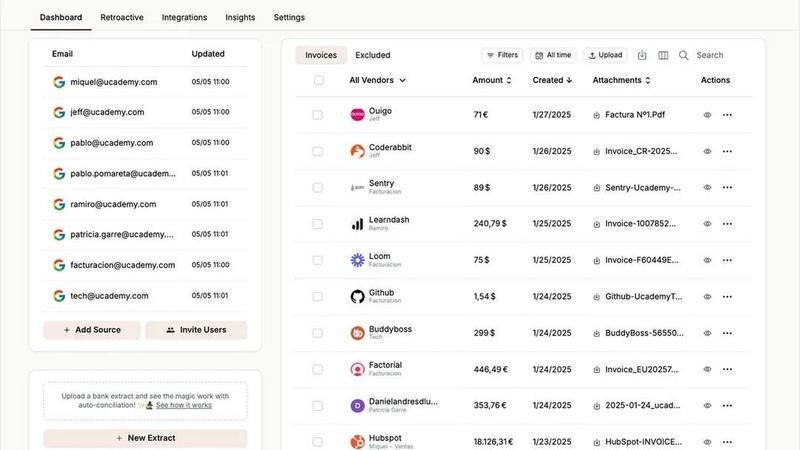
Tailride
Feature Comparison
ProcessBankStatement
Fast & Effortless Data Conversion
With ProcessBankStatement, users can upload their PDF bank statements and receive clean, structured CSV data in seconds. There is no complicated setup or time-consuming processes involved. The streamlined workflow allows users to focus on what matters most instead of getting bogged down with manual entries.
Enhanced Security & Privacy
Data security is a key feature of ProcessBankStatement. All uploaded files are encrypted during transit, ensuring that sensitive financial information remains safe from prying eyes. Users can also delete their files at any time, maintaining total control over their data and privacy.
Smart Data Extraction
The intelligent parsing engine of ProcessBankStatement is designed to accurately detect transactions and clean up formatting. This feature guarantees that the extracted data is structured and ready for immediate use in popular software like QuickBooks and Excel, making it easy to integrate into existing workflows.
Flexible Upload Options
ProcessBankStatement supports a variety of PDF file types, including multi-page and scanned documents. Users can easily upload their bank statements without needing to worry about special formatting, making the process as simple as drag and drop.
Tailride
Inbox Scanning & Monitoring
Tailride plugs natively into your email (and your team's emails) to continuously monitor for incoming invoices and receipts. It doesn't matter if the document is a PDF, image, in the email body, or behind a URL—our intelligent system finds and extracts it all automatically. No more forwarding emails to random addresses or frantic quarter-end searches for hundreds of missing documents. Your emails stay in your inbox, and all your financial documents are captured and organized without you lifting a finger.
Chrome Extension for Online Portals
Why log into dozens of accounts manually? Tailride's Chrome extension is your one-click solution for extracting invoices from over 20 major platforms including Amazon, Meta Ads, Adobe, Notion, Microsoft, and ChatGPT. This feature seamlessly bridges the gap for services that don't automatically email receipts, saving immense time and ensuring no business expense slips through the cracks, directly from the source.
AI-Powered Processing & Custom Rules
Beyond simple extraction, Tailride's AI intelligently reads each document. It extracts key data like date, amount, vendor, and tax. You can then train it further by setting up custom, company-specific rules for automatic categorization, approval workflows, and tagging. This means your SaaS subscriptions, ad spends, and operational costs are automatically sorted, making bookkeeping accurate and effortless.
Seamless Integrations & Reconciliation
Tailride doesn't create another data silo. It seamlessly pushes all organized invoice data directly into your existing accounting stack, including QuickBooks, Xero, and Google Drive. The powerful reconciliation feature then matches bank transactions with the extracted invoices, instantly identifying any missing documents or discrepancies. This closes the loop, ensuring your books are always complete, accurate, and audit-ready.
Use Cases
ProcessBankStatement
Streamlined Bookkeeping
For accountants and bookkeepers, ProcessBankStatement offers a way to streamline the bookkeeping process. By converting multiple bank statements into structured CSV files, professionals can save significant time and reduce errors associated with manual data entry.
Efficient Financial Analysis
Financial analysts can leverage the power of ProcessBankStatement to quickly convert bank statements into usable data formats. This allows for rapid analysis, enabling them to derive insights and make informed decisions without the hassle of sorting through unstructured data.
Simplified Client Onboarding
Financial consultants can integrate ProcessBankStatement into their client onboarding process. Clients can easily upload their bank statements, and consultants receive immediate access to structured data, enhancing efficiency and improving service delivery.
Hassle-Free Tax Preparation
During tax season, individuals and small business owners can use ProcessBankStatement to convert their bank statements into clean CSV files. This simplifies the tax preparation process, making it easier to gather necessary financial information and reducing the stress of meeting tax deadlines.
Tailride
For Fast-Growing Startups
Startups drowning in operational scale will find a lifesaver in Tailride. Connect the entire team's inboxes, automate the capture of expenses from every tool (via the Chrome extension), and set rules to categorize all spending. Within a week, achieve 100% invoice capture, eliminate manual data entry for the team, and save hundreds of hours monthly, allowing focus on growth, not admin.
For Accounting Firms & Bookkeepers
Accounting professionals managing multiple clients can use Tailride to streamline client onboarding and data collection. Instead of chasing clients for documents, simply connect their inboxes (with permission). Tailride automatically aggregates all invoices and receipts, organizes them, and syncs clean data to QuickBooks Online or Xero, slashing preparation time and enabling service for more clients.
For E-commerce & Digital Marketing Agencies
Businesses with heavy spending on platforms like Amazon, Meta Ads, and Google Ads need precise expense tracking. Tailride's Chrome extension extracts invoices directly from these portals in one click, while the inbox scanner catches everything else. All ad spend is automatically categorized and reconciled, making monthly client reporting and profit analysis swift and accurate.
For Managing Physical & Employee Expenses
Even in a digital world, paper receipts and employee expenses exist. Employees can simply take a picture of a physical receipt and send it to Tailride's dedicated Telegram or WhatsApp bot. The AI processes it instantly, adding it to the central dashboard. This creates a foolproof, user-friendly system for tracking all out-of-pocket expenses without manual forms or spreadsheets.
Overview
About ProcessBankStatement
ProcessBankStatement is an innovative tool designed to transform the way individuals and businesses handle their financial data. It simplifies the tedious task of manual data entry by allowing users to upload any PDF bank statement and instantly receive a downloadable CSV file. This service is perfect for accountants, small business owners, financial consultants, and anyone who needs a quick and efficient way to manage bank statements. With support for major U.S. banks such as Chase, Bank of America, and Wells Fargo, the tool ensures comprehensive compatibility. Security is a top priority; all data is encrypted, and users maintain full control over their files, with the option to delete them at any time. ProcessBankStatement is not just a time-saver; it empowers users to focus on analysis rather than data entry, making financial management seamless and hassle-free.
About Tailride
Stop drowning in a sea of PDFs and chasing down missing invoices. Tailride is the AI-powered accounting automation platform that finally lets you forget about manual data entry. It's built for fast-growing startups, savvy business owners, and forward-thinking accounting firms who are tired of administrative chaos. The core magic? Tailride connects directly to your company's email inboxes (Gmail, Outlook, IMAP) and acts as a 24/7 sentinel, automatically detecting, extracting, and processing every invoice and receipt that arrives—whether it's buried in an attachment, hidden in an email body, or behind a link. But it doesn't stop at your inbox. With a powerful Chrome extension, you can one-click extract invoices from over 20 online portals like Amazon, Meta Ads, Notion, and ChatGPT. Tailride then uses intelligent document recognition and customizable AI rules to categorize everything, before seamlessly syncing the organized data to QuickBooks, Xero, or Google Drive. Complete with robust bank reconciliation to match transactions and spot missing documents, Tailride transforms accounting from a monthly headache into a fully automated, flawless process. Hundreds of hours saved, complete visibility, and one very happy accountant.
Frequently Asked Questions
ProcessBankStatement FAQ
What file types are supported?
Currently, ProcessBankStatement supports PDF bank statements, which can be either text-based or scanned. This flexibility ensures that users can work with a wide variety of document types.
Can I upload scanned images or photos?
Yes! ProcessBankStatement fully supports scanned PDFs and image-based statements, allowing users to convert various formats without any issues.
Is there a free trial available?
Absolutely! Guests can process 3 pages per day for free, while registered users enjoy 5 pages per day without charge, making it easy to test the tool's capabilities before committing.
Is my data secure with ProcessBankStatement?
Yes, the security of your data is paramount. All files are encrypted during transmission, and users have complete control over their data, including the ability to delete files at any time for added peace of mind.
Tailride FAQ
How does Tailride access my emails? Is it secure?
Tailride establishes a secure, native connection with your email provider (like Gmail or Outlook) using OAuth, the same secure protocol used by other trusted apps. Your emails never leave your inbox; we only scan for and extract invoice and receipt data. You maintain full control, and you can revoke access at any time.
Can Tailride find and process old invoices from my inbox?
Absolutely! When you first connect, Tailride gives you the option to perform a retroactive scan. You can choose to find all invoices from "This Month," "This Quarter," "This Year," or even a custom date range. This lets you catch up on past bookkeeping instantly and start with a clean, complete record.
What if an invoice is not in an email but on a website like Amazon?
This is exactly why we built the Tailride Chrome extension. For over 20 platforms (Amazon, Meta Ads, Notion, etc.) that don't always email invoices, you simply navigate to your account, click the Tailride extension, and extract the invoice directly. It then flows into the same automated processing pipeline as your email invoices.
Can I connect multiple team members or client inboxes?
Yes, and this is a core strength of Tailride. You can connect as many email inboxes as needed—whether they belong to your colleagues or your clients (with their permission). This provides complete visibility into all incoming expenses across the entire organization or your client base, eliminating information silos.
Alternatives
ProcessBankStatement Alternatives
ProcessBankStatement is an innovative tool designed for effortless data extraction from PDF bank statements, making it a valuable asset in the Business & Finance category. Users often seek alternatives due to factors such as pricing, desired features, or specific platform compatibility. When exploring options, it is essential to consider factors like data security, ease of use, and the ability to integrate with existing software solutions to ensure a seamless experience.
Tailride Alternatives
Tailride is an AI-powered accounting automation platform that transforms how businesses handle invoices and receipts. It belongs to the fast-growing category of financial operations software, designed to save time and reduce manual data entry by automating document capture and processing. Users often explore alternatives for various reasons, such as budget constraints, specific feature requirements, or the need for integration with a particular tech stack. Some may seek simpler tools, while others require more advanced enterprise-level functionality. When evaluating other options, key considerations include the accuracy of the AI extraction, the breadth of platform integrations, the flexibility of automation rules, and the overall security of your financial data. The right fit should seamlessly connect with your existing workflow.