
AI Couple vs Shrinkpad


Visual Comparison
AI Couple
Shrinkpad
Overview
About AI Couple
AI Couple — Overview
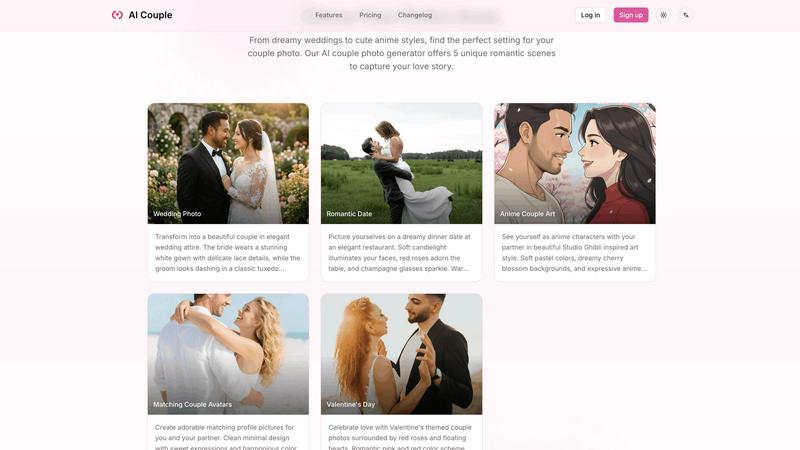
AI Couple is a web-based AI image generator that creates romantic couple photos by blending two face images into predefined scenes. It targets users who want wedding previews, anniversary keepsakes, matching avatars, anime-style couple art, or social media-ready romantic imagery without a photoshoot.
Key Features
- Fast image generation: Most outputs in 20–45 seconds; complex wedding scenes up to ~60s.
- Multiple preset scenes: Wedding Photo, Romantic Date, Anime Couple Art, Matching Avatars, and Valentine's Day.
- Easy workflow: Upload two photos, pick a scene, optionally add a short prompt, and generate.
- Privacy-first processing: 256-bit SSL encryption, isolated processing environments, explicit no-sharing or training policy, user-controlled deletion.
- Mobile-friendly UI: Works in modern mobile browsers without an app.
- Free trial and paid credits: Try for free; purchase credits for unlimited / high-volume use.
Practical Applications / Use Cases
- Wedding preview images for couples planning attire and photography style.
- Personalized anniversary or Valentine’s digital cards and social posts.
- Custom matching avatars for social media profiles or couples’ branding.
- Anime-inspired couple art for fans and creators.
- Low-cost commercial uses: promotional imagery, invitations, or mockups for wedding services.
About Shrinkpad
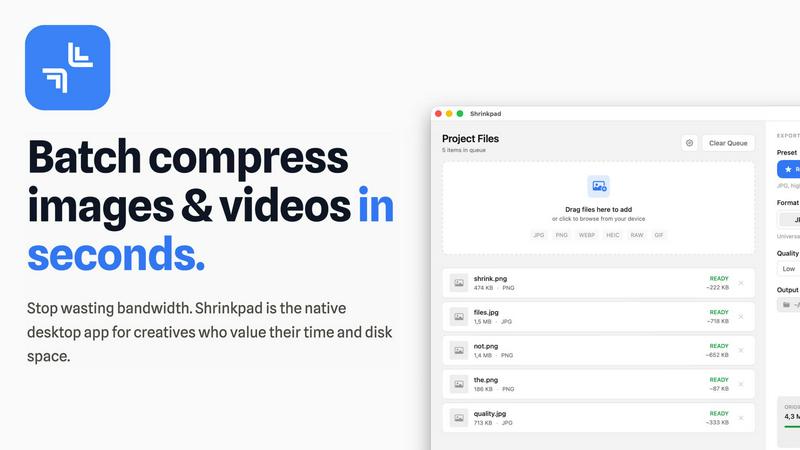
Batch compress images and videos on Mac. Drop hundreds of files or entire folders, pick your settings, and compress in seconds. Everything stays on your device.
ShrinkPad processes all your media locally using native macOS frameworks. No uploads, no cloud, no waiting for servers. Your files never leave your Mac, giving you complete privacy and zero dependency on internet connection.
Reduce file sizes by up to 90% while keeping visual quality intact. Whether you're compressing iPhone photos, high-resolution images, or 4K videos, ShrinkPad maintains the quality you need while cutting storage significantly.
The app supports 50+ formats out of the box. JPG, PNG, HEIC, WebP for images. MP4, MOV for videos. No need to convert files first or worry about compatibility. Just drag and drop, and ShrinkPad handles the rest.
Customize everything to fit your workflow. Choose from quality presets or fine-tune compression settings manually. Set your preferred output format, create custom file naming patterns, and pick your export location. Preserve or strip metadata with a single click.
Stop processing files one by one. With ShrinkPad, you can drag an entire folder and compress everything inside in one go. Hundreds of files, processed in seconds, not hours.
Built for photographers, designers, content creators, and anyone tired of bloated media files eating up storage space.
Simple interface. Powerful compression. Complete privacy.