
FaceShot vs Shrinkpad

FaceShot
Get stunning professional headshots from just one selfie in seconds, no studio needed.
Last updated: February 27, 2026

Shrinkpad
Effortlessly batch compress images and videos on Mac to save time, space, and improve performance with Shrinkpad.
Last updated: February 28, 2026
Visual Comparison
FaceShot
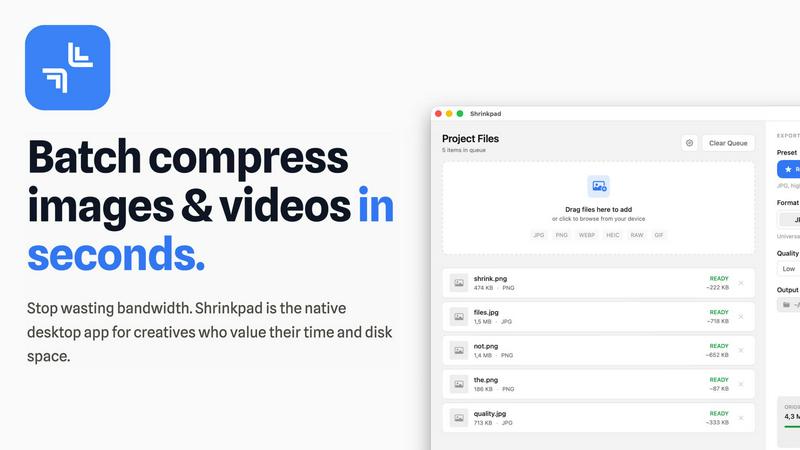
Shrinkpad
Feature Comparison
FaceShot
Instant Headshot Generation
FaceShot allows users to generate professional headshots from a single selfie in just about 60 seconds. This rapid turnaround time means you can have a polished image ready for any occasion without the long wait associated with traditional photography.
Diverse Style Options
With over 20 customizable styles to choose from, including executive and creative looks, FaceShot caters to various professions and personal branding needs. This variety ensures that users can select a headshot style that best represents their unique personality and professional image.
AI-Enhanced Quality
The AI technology behind FaceShot specializes in portrait photography, which guarantees that the generated headshots exhibit superior quality. Natural skin tones, appropriate lighting, and professional-looking backgrounds are all handled automatically, ensuring each portrait meets high standards.
High-Resolution Downloads
Every portrait generated through FaceShot is available for download in full resolution without any watermarks. Users can confidently use their images across platforms, knowing they have high-quality, professional headshots that enhance their personal or corporate branding.
Shrinkpad
Batch Compression
Shrinkpad allows you to drag and drop entire folders filled with images and videos for batch processing. This feature dramatically reduces the time spent on individual file compression, handling everything in seconds rather than hours.
Local Processing
With Shrinkpad, all your files are processed locally on your Mac. This means no uploads, no cloud dependencies, and complete privacy. Your sensitive assets remain on your device, giving you peace of mind.
Format Support
The app supports over 50 file formats, including popular image formats like JPG, PNG, and HEIC, as well as video formats such as MP4 and MOV. You can compress a variety of media types without worrying about compatibility issues.
Customization Options
Shrinkpad provides extensive customization options to fit your workflow. You can choose from quality presets, manually adjust compression settings, and even create custom file naming patterns. This allows for tailored outputs based on your specific needs.
Use Cases
FaceShot
LinkedIn Profiles
Professionals can easily enhance their LinkedIn profiles with eye-catching headshots that convey confidence and approachability. With FaceShot, users can instantly create a polished image that stands out to recruiters and connections alike.
Corporate Team Pages
Businesses can streamline the process of updating their team pages by utilizing FaceShot to generate consistent and professional headshots for all employees. This efficiency eliminates the logistical challenges of coordinating individual photo shoots.
Speaker Bios
For those preparing for conferences or public speaking engagements, FaceShot provides an easy way to create striking headshots that reflect professionalism. A well-crafted image can significantly enhance speaker bios and promotional materials.
Personal Branding on Social Media
Individuals looking to enhance their personal brands on social media can use FaceShot to create authentic yet professional headshots. Whether for dating profiles, personal websites, or portfolios, these high-quality images help users make a lasting impression.
Shrinkpad
Photographer Workflow Optimization
Photographers can use Shrinkpad to quickly compress large batches of high-resolution images from a shoot. This not only saves storage space but also speeds up the process of preparing images for sharing or printing.
Web Development and Design
Web designers can benefit from Shrinkpad by optimizing images and videos before uploading them to websites. This leads to faster load times and improved user experience, essential for maintaining visitor engagement.
Content Creation for Social Media
Content creators can leverage Shrinkpad to compress video files for platforms like Instagram and YouTube. By maintaining high visual quality while reducing file sizes, creators can easily share their work without worrying about upload limits.
Team Collaboration in Studios
Small studios can utilize Shrinkpad to streamline their asset management. With the ability to batch process files and maintain quality, teams can collaborate effectively, ensuring that everyone has access to optimized media.
Overview
About FaceShot
FaceShot is a revolutionary AI-driven platform that transforms your ordinary selfies into stunning, studio-quality professional headshots in mere minutes. Designed for individuals and businesses alike, FaceShot eliminates the need for traditional photoshoots, allowing users to bypass the hassle of booking appointments, traveling to studios, and waiting for photo development. Whether you are looking to enhance your LinkedIn profile, create a standout team page, or refresh your personal image for social media, FaceShot provides a streamlined experience with impressive results. The platform harnesses advanced AI technology specifically tailored for portrait photography, ensuring that your headshots reflect natural skin tones, professional backgrounds, and impeccable lighting. With a user-friendly interface, you can upload a clear photo, select from over 20 distinct styles, and receive high-resolution portraits in approximately one minute, making it a game-changing solution for anyone needing high-quality images quickly and effortlessly.
About Shrinkpad
Shrinkpad is an innovative batch compression tool designed specifically for Mac users who want to efficiently manage their media files. It allows you to compress hundreds of images and videos simultaneously, ensuring that everything stays on your device for maximum privacy. With a focus on speed and efficiency, Shrinkpad utilizes native macOS frameworks to process files locally, eliminating the need for cloud uploads or slow server processing. This makes it ideal for photographers, designers, content creators, and anyone overwhelmed by bloated media files. By reducing file sizes by up to 90% without sacrificing quality, Shrinkpad helps you reclaim valuable disk space and optimize your workflow. Its user-friendly interface and powerful features make it an essential tool for anyone looking to streamline their media management.
Frequently Asked Questions
FaceShot FAQ
How does FaceShot work?
FaceShot operates by allowing users to upload a clear photo or take one using their webcam. After selecting a preferred style from over 20 options, the AI generates multiple high-resolution portraits in seconds.
Is there a limit to how many headshots I can create?
FaceShot provides one free credit for the first headshot generation, allowing users to try the service. Additional credits can be purchased for more headshots or advanced features like premium styles.
What types of styles are available?
FaceShot offers a variety of styles catering to different professional needs, including executive, creative, tech casual, and editorial options. This diversity allows users to select a look that resonates with their personal brand or industry.
Can I use the headshots for commercial purposes?
Yes, all portraits generated by FaceShot are available for download in full resolution without watermarks, making them suitable for commercial use on websites, marketing materials, and professional profiles. Users can confidently showcase their images in any context.
Shrinkpad FAQ
Can I use Shrinkpad for free?
Yes, Shrinkpad offers a Free Starter plan that includes essential tools for casual use, allowing you to compress up to 10 files per batch with standard compression.
What file formats does Shrinkpad support?
Shrinkpad supports over 50 formats out of the box, including JPG, PNG, HEIC, WEBP for images, and MP4, MOV for videos, ensuring compatibility with a wide range of media types.
Does Shrinkpad support video compression?
Absolutely! Shrinkpad allows users to compress video files alongside images, making it an all-in-one solution for managing various media formats efficiently.
Can I control the compression quality?
Yes, Shrinkpad offers both automatic and manual compression settings. You can choose from quality presets or fine-tune the compression parameters to achieve the desired balance between file size and visual quality.
Alternatives
FaceShot Alternatives
FaceShot is an innovative AI-driven tool that transforms a simple selfie into professional-grade headshots without the need for a studio or a photographer. It belongs to the AI Assistants and Image Generation categories, catering to anyone in need of high-quality portraits for various purposes, from LinkedIn profiles to team pages. Users often seek alternatives for reasons like pricing, specific feature sets, or compatibility with their preferred platforms. When choosing an alternative, consider factors such as ease of use, output quality, variety of styles offered, and turnaround time to ensure a solution that meets your unique needs.
Shrinkpad Alternatives
ShrinkPad is an innovative batch compression tool designed specifically for Mac users, allowing them to effortlessly compress images and videos without sacrificing quality. It stands out in the image and video processing category by offering a seamless drag-and-drop experience, ensuring that users can quickly reduce file sizes while keeping their media files secure and private. However, users often seek alternatives to ShrinkPad for various reasons, including pricing, desired features, or platform compatibility. When looking for an alternative, it's essential to consider factors such as ease of use, the range of supported formats, customization options, and the level of privacy offered. A reliable alternative should meet specific needs while providing a user-friendly experience.