
Shrinkpad vs SoloPass

Shrinkpad
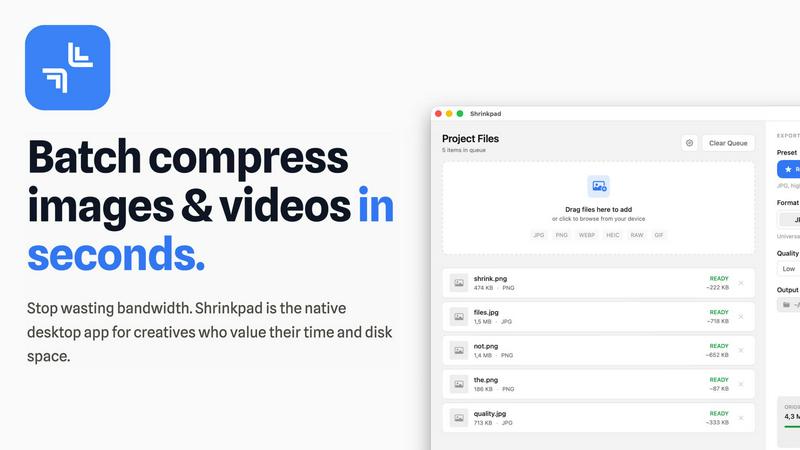
Effortlessly batch compress images and videos on Mac to save time, space, and improve performance with Shrinkpad.
Last updated: February 28, 2026

SoloPass
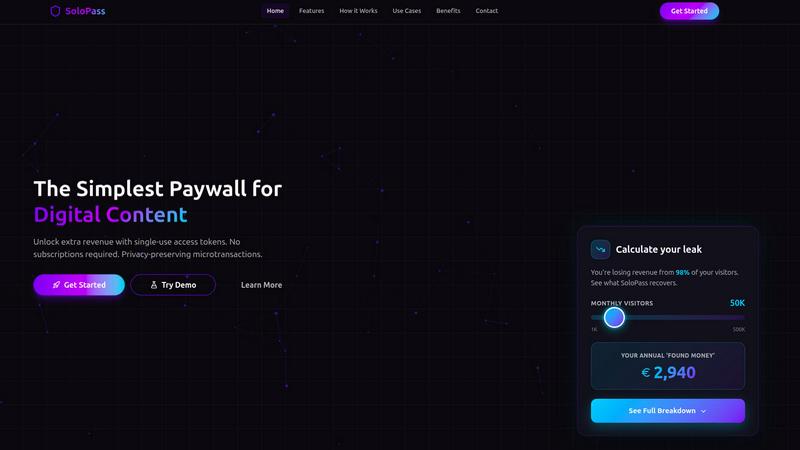
SoloPass is your all-in-one solution to monetize digital content with flexible payments and secure delivery.
Last updated: February 28, 2026
Visual Comparison
Shrinkpad
SoloPass
Feature Comparison
Shrinkpad
Batch Compression
Shrinkpad allows you to drag and drop entire folders filled with images and videos for batch processing. This feature dramatically reduces the time spent on individual file compression, handling everything in seconds rather than hours.
Local Processing
With Shrinkpad, all your files are processed locally on your Mac. This means no uploads, no cloud dependencies, and complete privacy. Your sensitive assets remain on your device, giving you peace of mind.
Format Support
The app supports over 50 file formats, including popular image formats like JPG, PNG, and HEIC, as well as video formats such as MP4 and MOV. You can compress a variety of media types without worrying about compatibility issues.
Customization Options
Shrinkpad provides extensive customization options to fit your workflow. You can choose from quality presets, manually adjust compression settings, and even create custom file naming patterns. This allows for tailored outputs based on your specific needs.
SoloPass
Flexible Payment Options
SoloPass offers a variety of payment methods, including subscriptions and single-access purchases, allowing users to choose how they want to support their favorite creators. This flexibility simplifies the purchasing process and caters to diverse audience preferences.
Subscription Management
With SoloPass, the entire subscription lifecycle is automated. This includes managing free trials, billing cycles, plan upgrades, cancellations, and dunning processes, ensuring that creators can focus on their content while the platform handles the administrative tasks.
Privacy by Design
SoloPass is built with user privacy in mind. Users can either sign in using their social accounts for ease or choose to create anonymous 16-digit account numbers, ensuring that no personal data is collected, thus fostering trust and security.
Secure Content Delivery
All content sold through SoloPass is encrypted until payment is confirmed. Once payment is made, content is delivered directly to the buyer's device, minimizing unauthorized access and reducing piracy risks, thus protecting creators' intellectual property.
Use Cases
Shrinkpad
Photographer Workflow Optimization
Photographers can use Shrinkpad to quickly compress large batches of high-resolution images from a shoot. This not only saves storage space but also speeds up the process of preparing images for sharing or printing.
Web Development and Design
Web designers can benefit from Shrinkpad by optimizing images and videos before uploading them to websites. This leads to faster load times and improved user experience, essential for maintaining visitor engagement.
Content Creation for Social Media
Content creators can leverage Shrinkpad to compress video files for platforms like Instagram and YouTube. By maintaining high visual quality while reducing file sizes, creators can easily share their work without worrying about upload limits.
Team Collaboration in Studios
Small studios can utilize Shrinkpad to streamline their asset management. With the ability to batch process files and maintain quality, teams can collaborate effectively, ensuring that everyone has access to optimized media.
SoloPass
Monetizing Digital Articles
Writers and bloggers can use SoloPass to sell their articles on a per-piece basis. This allows readers to pay only for the content they want, increasing engagement and providing a steady revenue stream for authors.
Video Content Sales
Video creators can leverage SoloPass to sell individual videos or series episodes directly to their audience. This model supports both casual viewers and dedicated fans, offering a way to monetize exclusive content without requiring a subscription.
Digital Downloads
SoloPass enables artists and designers to sell digital files such as PDFs, audio, or software. Customers can purchase these items as one-off transactions, ensuring instant access to their purchases.
Hybrid Monetization Strategies
Content creators can combine subscriptions with single-access purchases using SoloPass. Subscribers might receive basic content, while premium articles or exclusive downloads can be available for individual purchase, maximizing revenue potential from different audience segments.
Overview
About Shrinkpad
Shrinkpad is an innovative batch compression tool designed specifically for Mac users who want to efficiently manage their media files. It allows you to compress hundreds of images and videos simultaneously, ensuring that everything stays on your device for maximum privacy. With a focus on speed and efficiency, Shrinkpad utilizes native macOS frameworks to process files locally, eliminating the need for cloud uploads or slow server processing. This makes it ideal for photographers, designers, content creators, and anyone overwhelmed by bloated media files. By reducing file sizes by up to 90% without sacrificing quality, Shrinkpad helps you reclaim valuable disk space and optimize your workflow. Its user-friendly interface and powerful features make it an essential tool for anyone looking to streamline their media management.
About SoloPass
SoloPass is a revolutionary micropayment platform that prioritizes user privacy while enabling digital creators and publishers to monetize their content effectively. Designed for those who want to sell individual pieces of content without tying customers into monthly subscription commitments, SoloPass facilitates seamless one-click access through single-use payment tokens. This platform is perfect for authors, video creators, and digital publishers who seek an efficient way to generate revenue from their work. With SoloPass, users can enjoy the flexibility of a privacy-first approach, as they can opt for anonymous 16-digit account numbers that do not require personal data. The platform leverages secure Open Banking APIs, reducing transaction friction and fees. Additionally, SoloPass offers a quick integration process for publishers, allowing them to protect their content with minimal coding. With AI-driven dynamic pricing, creators can maximize revenue by adjusting content costs based on demand, making SoloPass an indispensable tool for modern digital monetization.
Frequently Asked Questions
Shrinkpad FAQ
Can I use Shrinkpad for free?
Yes, Shrinkpad offers a Free Starter plan that includes essential tools for casual use, allowing you to compress up to 10 files per batch with standard compression.
What file formats does Shrinkpad support?
Shrinkpad supports over 50 formats out of the box, including JPG, PNG, HEIC, WEBP for images, and MP4, MOV for videos, ensuring compatibility with a wide range of media types.
Does Shrinkpad support video compression?
Absolutely! Shrinkpad allows users to compress video files alongside images, making it an all-in-one solution for managing various media formats efficiently.
Can I control the compression quality?
Yes, Shrinkpad offers both automatic and manual compression settings. You can choose from quality presets or fine-tune the compression parameters to achieve the desired balance between file size and visual quality.
SoloPass FAQ
How does SoloPass ensure user privacy?
SoloPass allows users to create anonymous 16-digit account numbers that require no personal data collection. This means users can enjoy content without compromising their privacy.
What types of content can be monetized with SoloPass?
SoloPass can be used to monetize a wide range of digital content, including articles, videos, PDFs, audio files, and more, providing a versatile platform for various creators.
Is integration difficult for publishers?
Not at all! SoloPass offers a "5-minute integration" process with simple code snippets, allowing publishers to protect their content quickly and easily without extensive technical knowledge.
How does SoloPass handle payments and disputes?
SoloPass manages all payment processing, disputes, and settlements on an invoice basis, aggregating transactions for both subscriptions and single purchases, which streamlines financial management for creators.
Alternatives
Shrinkpad Alternatives
ShrinkPad is an innovative batch compression tool designed specifically for Mac users, allowing them to effortlessly compress images and videos without sacrificing quality. It stands out in the image and video processing category by offering a seamless drag-and-drop experience, ensuring that users can quickly reduce file sizes while keeping their media files secure and private. However, users often seek alternatives to ShrinkPad for various reasons, including pricing, desired features, or platform compatibility. When looking for an alternative, it's essential to consider factors such as ease of use, the range of supported formats, customization options, and the level of privacy offered. A reliable alternative should meet specific needs while providing a user-friendly experience.
SoloPass Alternatives
SoloPass is a cutting-edge micropayment platform tailored for digital creators and publishers who want to monetize their content without the hassle of monthly subscriptions. By providing a seamless one-click payment process for individual pieces of content, SoloPass stands out in the APIs and software category, focusing on privacy and user experience. Users often seek alternatives to SoloPass for various reasons, including pricing structures, feature sets, and specific platform needs. When exploring alternatives, it’s crucial to consider factors such as ease of integration, payment processing efficiency, privacy features, and the overall user experience. A robust alternative should not only meet the functional needs of creators but also align with their values regarding user privacy and payment simplicity.