
Dokta vs SoloTools

Dokta
Dokta automates document management for freelancers, effortlessly handling invoices, contracts, and cash flow in just a few clicks.
Last updated: April 4, 2026

Last updated: February 28, 2026
Visual Comparison
Dokta
SoloTools
Overview
About Dokta
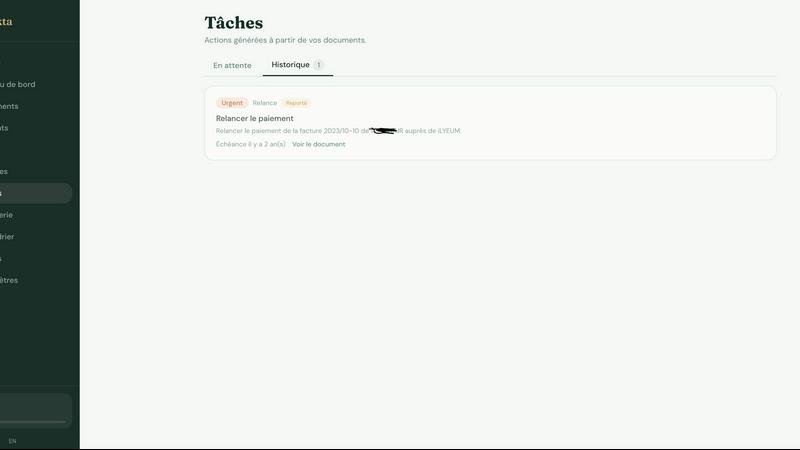
Dokta is an innovative AI-powered document management platform designed specifically for freelancers, solo entrepreneurs, auto-entrepreneurs, and small to medium-sized businesses (SMBs). With its powerful AI engine, Dokta simplifies document handling by allowing users to effortlessly drop invoices, quotes, contracts, and more, and receiving key data extraction in under 60 seconds. The platform manages the entire document lifecycle, enabling users to create professional invoices, track payments, send automated reminders for unpaid invoices, and manage contracts and deadlines, all with ease. Dokta eliminates the stress of lost files and missed deadlines, allowing users to focus on their core business activities. By building a comprehensive client database and providing real-time cash flow tracking, Dokta empowers users to streamline their financial operations. With a commitment to data privacy, Dokta is fully GDPR-compliant and hosted in Europe (AWS), making it a secure choice for managing sensitive business documents. Whether you are a freelance developer, a consultant, a trades contractor, or managing a growing SMB, Dokta puts your documents at the center of your operations, driven by cutting-edge AI technology.
About SoloTools
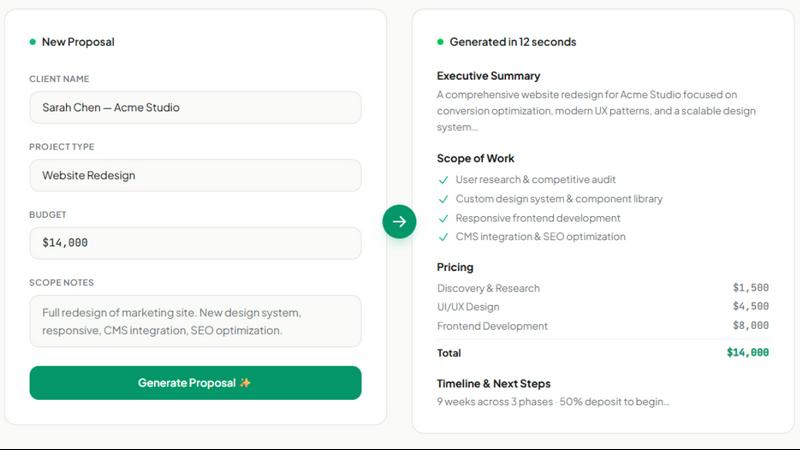
SoloTools is an AI proposal generator built specifically for freelancers and independent consultants. Instead of staring at a blank document for hours, you describe your project in 30 seconds — client name, project type, budget, and a few scope notes — and AI generates a polished, client-ready proposal complete with an executive summary, scope of work, itemized pricing, timeline, and standard terms.
Every proposal is fully editable, downloadable as a PDF, and shareable via a branded link. The free plan includes 3 proposals per month. Pro ($14.99/month) unlocks unlimited proposals, custom branding, and proposal view analytics so you know exactly when a client opens your proposal.
Alternatives
Dokta Alternatives
Dokta is an innovative AI-powered document management platform tailored for freelancers, solo entrepreneurs, auto-entrepreneurs, and small to medium-sized businesses (SMBs). It simplifies the document handling process by reading, classifying, and extracting key data from invoices, quotes, and contracts in a flash. While its features are robust, users often seek alternatives due to varying needs such as pricing considerations, specific feature sets, or compatibility with existing platforms. When searching for a suitable alternative, it’s essential to evaluate aspects like ease of use, scalability, security compliance, and the specific functionalities that meet your business requirements. Finding the right document management solution can significantly enhance productivity and streamline operations. Alternatives to Dokta should be assessed based on their ability to manage the full document lifecycle, automate administrative tasks, and provide real-time insights into cash flow. Always prioritize options that offer flexibility in pricing and a user-friendly interface to ensure a smooth transition and integration into your workflow.
SoloTools Alternatives
SoloTools is an innovative AI proposal generator tailored for freelancers and independent consultants, designed to streamline the proposal creation process. By simply inputting project details such as client name, project type, budget, and some scope notes, users can receive a polished, client-ready proposal in mere seconds. This tool falls under the Business & Finance category, making it an essential asset for those looking to enhance their freelance operations. Users often seek alternatives to SoloTools for various reasons, including pricing structures, feature sets, or specific platform requirements that better align with their business needs. When searching for an alternative, consider aspects such as ease of use, customization options, pricing tiers, and whether the platform offers essential features like analytics or collaboration tools. The right alternative should cater to your unique workflow and enhance your productivity as a freelancer.