
ProcessBankStatement vs Tradepal

ProcessBankStatement
Convert your PDF bank statements to clean CSVs in seconds with ProcessBankStatement—fast, secure, and hassle-free data extraction.
Last updated: March 11, 2026

Tradepal
Tradepal is your AI trading co-pilot, delivering real-time insights and forecasts to enhance your trading decisions.
Last updated: February 28, 2026
Visual Comparison
ProcessBankStatement
Tradepal
Feature Comparison
ProcessBankStatement
Fast & Effortless Data Conversion
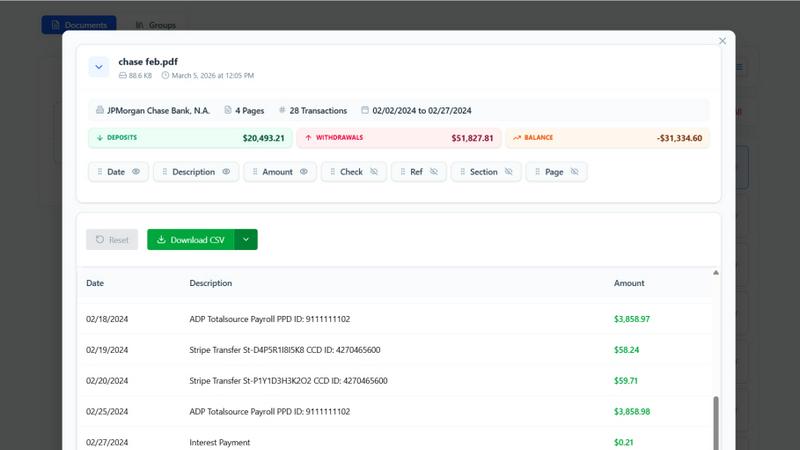
With ProcessBankStatement, users can upload their PDF bank statements and receive clean, structured CSV data in seconds. There is no complicated setup or time-consuming processes involved. The streamlined workflow allows users to focus on what matters most instead of getting bogged down with manual entries.
Enhanced Security & Privacy
Data security is a key feature of ProcessBankStatement. All uploaded files are encrypted during transit, ensuring that sensitive financial information remains safe from prying eyes. Users can also delete their files at any time, maintaining total control over their data and privacy.
Smart Data Extraction
The intelligent parsing engine of ProcessBankStatement is designed to accurately detect transactions and clean up formatting. This feature guarantees that the extracted data is structured and ready for immediate use in popular software like QuickBooks and Excel, making it easy to integrate into existing workflows.
Flexible Upload Options
ProcessBankStatement supports a variety of PDF file types, including multi-page and scanned documents. Users can easily upload their bank statements without needing to worry about special formatting, making the process as simple as drag and drop.
Tradepal
AI Forecasts
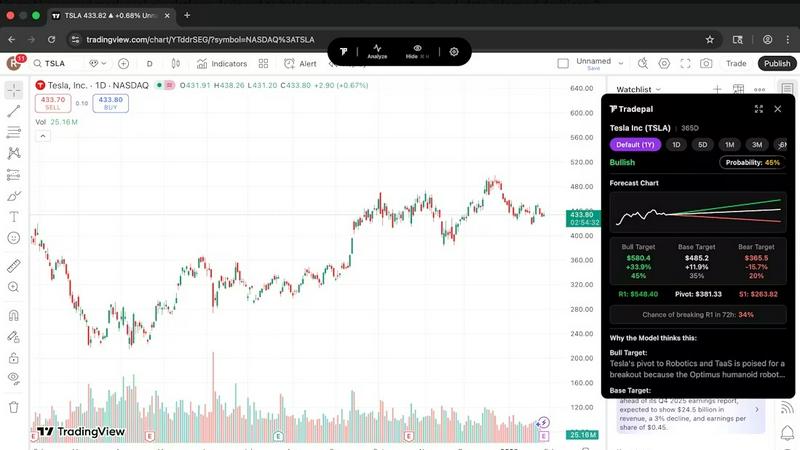
Tradepal provides intraday forecasts for price ranges, reversals, and volatility. These forecasts are generated from a blended AI ensemble that updates in real time, allowing traders to assess risks before they manifest in price movements. This feature helps traders stay ahead of market changes and make proactive decisions.
Price Cone Projections
With Tradepal's intuitive layout, users can visualize forward price cones directly on their charts. This feature is customizable according to individual trading styles, enabling traders to save their preferred views for future sessions. It enhances the user experience by providing clear and actionable insights.
News and Sentiment Analysis
Stay informed with Tradepal's comprehensive news and sentiment analysis feature. Traders can track the market mood across professional trading sources and financial news in one consolidated stream. This allows users to recognize when crowd conviction is building, potentially signaling impending market movements.
Universal Chart Support
Tradepal’s AI technology ensures that users can analyze any chart from any platform instantly. By simply displaying a stock chart or uploading a screenshot, Tradepal delivers forecasts, sentiment, and price targets in seconds. This universal support empowers traders to leverage AI insights regardless of their chosen trading platform.
Use Cases
ProcessBankStatement
Streamlined Bookkeeping
For accountants and bookkeepers, ProcessBankStatement offers a way to streamline the bookkeeping process. By converting multiple bank statements into structured CSV files, professionals can save significant time and reduce errors associated with manual data entry.
Efficient Financial Analysis
Financial analysts can leverage the power of ProcessBankStatement to quickly convert bank statements into usable data formats. This allows for rapid analysis, enabling them to derive insights and make informed decisions without the hassle of sorting through unstructured data.
Simplified Client Onboarding
Financial consultants can integrate ProcessBankStatement into their client onboarding process. Clients can easily upload their bank statements, and consultants receive immediate access to structured data, enhancing efficiency and improving service delivery.
Hassle-Free Tax Preparation
During tax season, individuals and small business owners can use ProcessBankStatement to convert their bank statements into clean CSV files. This simplifies the tax preparation process, making it easier to gather necessary financial information and reducing the stress of meeting tax deadlines.
Tradepal
Validating Trading Ideas
Traders can use Tradepal to validate their trading strategies and ideas by analyzing stock charts quickly. The AI-generated insights help confirm or challenge their initial thoughts, fostering more informed decision-making and reducing reliance on gut feelings.
Monitoring Market Sentiment
Active traders can leverage the news and sentiment analysis feature to keep a pulse on market mood. By tracking sentiment trends, they can position themselves strategically and take advantage of emerging opportunities before the broader market reacts.
Executing Quick Analysis
During busy trading sessions, traders can use Tradepal to conduct quick analyses of multiple stocks. By simply clicking "Analyze," they can receive immediate insights that help them make fast, informed trades without being bogged down by extensive research.
Creating Custom Watchlists
Traders can create personalized watchlists with smart alerts for unusual activity and risk stress events. This feature allows users to stay prepared and focused on the stocks that matter most to them without needing to monitor the market continuously.
Overview
About ProcessBankStatement
ProcessBankStatement is an innovative tool designed to transform the way individuals and businesses handle their financial data. It simplifies the tedious task of manual data entry by allowing users to upload any PDF bank statement and instantly receive a downloadable CSV file. This service is perfect for accountants, small business owners, financial consultants, and anyone who needs a quick and efficient way to manage bank statements. With support for major U.S. banks such as Chase, Bank of America, and Wells Fargo, the tool ensures comprehensive compatibility. Security is a top priority; all data is encrypted, and users maintain full control over their files, with the option to delete them at any time. ProcessBankStatement is not just a time-saver; it empowers users to focus on analysis rather than data entry, making financial management seamless and hassle-free.
About Tradepal
Tradepal is an innovative AI-powered trading assistant designed specifically for active traders and investors seeking fast, objective chart analysis without the hassle of manual guesswork. This powerful tool allows users to analyze any U.S.-listed stock chart effortlessly by simply clicking "Analyze" while the chart is displayed or by uploading a screenshot through the web app. Tradepal harnesses advanced AI technology to detect essential technical patterns, identify support and resistance levels, assess trend strength, and evaluate momentum. It then generates clear scenarios for bullish, bearish, and base outcomes, complete with confidence scores and price targets. Unlike conventional trading platforms, Tradepal does not execute trades; instead, it serves as a reliable second opinion, helping traders validate their ideas, minimize emotional biases, and make more informed decisions. Designed to integrate seamlessly into existing workflows, Tradepal works across popular charting platforms, ensuring a lightweight, fast, and trader-focused experience. It is the ideal solution for those who want AI assistance without disrupting their trading habits.
Frequently Asked Questions
ProcessBankStatement FAQ
What file types are supported?
Currently, ProcessBankStatement supports PDF bank statements, which can be either text-based or scanned. This flexibility ensures that users can work with a wide variety of document types.
Can I upload scanned images or photos?
Yes! ProcessBankStatement fully supports scanned PDFs and image-based statements, allowing users to convert various formats without any issues.
Is there a free trial available?
Absolutely! Guests can process 3 pages per day for free, while registered users enjoy 5 pages per day without charge, making it easy to test the tool's capabilities before committing.
Is my data secure with ProcessBankStatement?
Yes, the security of your data is paramount. All files are encrypted during transmission, and users have complete control over their data, including the ability to delete files at any time for added peace of mind.
Tradepal FAQ
How do I use Tradepal?
After signing up, you can download Tradepal for macOS or Windows, which remains accessible while you trade. When viewing a U.S.-listed stock chart on any platform, simply click "Analyze," and Tradepal instantly generates insights based on the chart.
Is Tradepal financial advice?
Tradepal provides analysis and insights based on AI and charting data but is not a substitute for personalized financial advice. Users should consider their own financial situations and consult with a financial advisor when making investment decisions.
What charts are compatible with Tradepal?
Tradepal is compatible with any U.S.-listed stock charts from various platforms. Users can analyze charts displayed on their preferred trading software or upload screenshots for analysis through the web app.
Does Tradepal work on all timeframes?
Yes, Tradepal is designed to work on various timeframes, enabling traders to analyze charts from intraday to longer-term perspectives. This versatility makes it a valuable tool for different trading styles and strategies.
Alternatives
ProcessBankStatement Alternatives
ProcessBankStatement is an innovative tool designed for effortless data extraction from PDF bank statements, making it a valuable asset in the Business & Finance category. Users often seek alternatives due to factors such as pricing, desired features, or specific platform compatibility. When exploring options, it is essential to consider factors like data security, ease of use, and the ability to integrate with existing software solutions to ensure a seamless experience.
Tradepal Alternatives
Tradepal is an innovative AI-powered trading assistant designed for active traders and investors seeking efficient and objective chart analysis. With its ability to analyze U.S.-listed stock charts quickly, Tradepal eliminates guesswork by detecting key technical patterns, support and resistance levels, and generating actionable insights. This unique approach positions Tradepal within the Business & Finance category, catering to those who want to enhance their trading decisions. Users often seek alternatives to Tradepal for a variety of reasons, including pricing, specific feature sets, or compatibility with different trading platforms. When exploring alternatives, it's essential to consider factors such as the ease of integration into existing workflows, the quality of the analysis provided, and the overall user experience. Choosing the right trading assistant can significantly impact your trading strategy, so take the time to assess how well the alternative meets your individual needs.