
Before After Photo Maker vs Shrinkpad

Before After Photo Maker
Effortlessly create stunning before and after photo comparisons online with customizable layouts and high-quality exports.
Last updated: March 26, 2026

Shrinkpad
Effortlessly batch compress images and videos on Mac to save time, space, and improve performance with Shrinkpad.
Last updated: February 28, 2026
Visual Comparison
Before After Photo Maker
Shrinkpad
Feature Comparison
Before After Photo Maker
Multiple Comparison Layouts
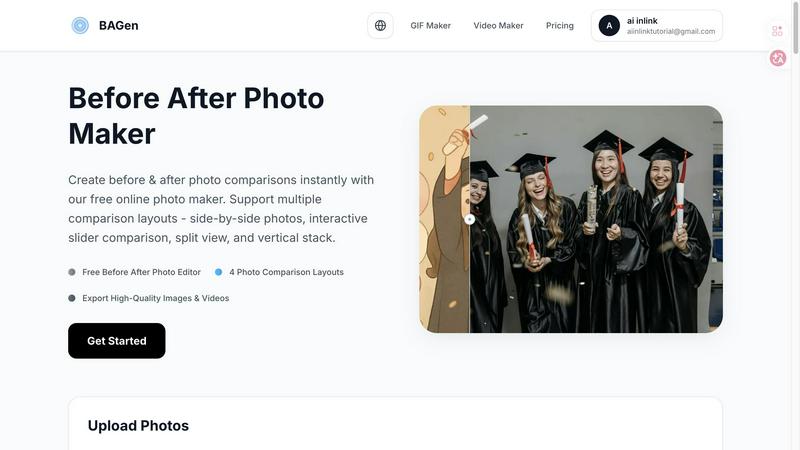
Before After Photo Maker offers four distinct layouts to choose from: side-by-side, interactive slider, split view, and vertical stack. This flexibility enables users to select the most effective visual representation for their specific needs, whether for social media or professional presentations.
High-Quality Export Options
Users can easily export their created comparisons in high-quality formats, including images and interactive videos. This ensures that the final product maintains clarity and professionalism, making it suitable for various platforms and uses.
Customizable Labels and Watermarks
The tool allows users to add customizable labels to their images, adjusting size and radius as needed. Additionally, users can upload a company logo to feature in their comparisons, enhancing brand visibility and recognition.
Live Preview Functionality
Before After Photo Maker includes a live preview feature, enabling users to see their edits in real-time. This immediate feedback loop ensures that adjustments can be made easily, allowing for a polished final product before export.
Shrinkpad
Batch Compression
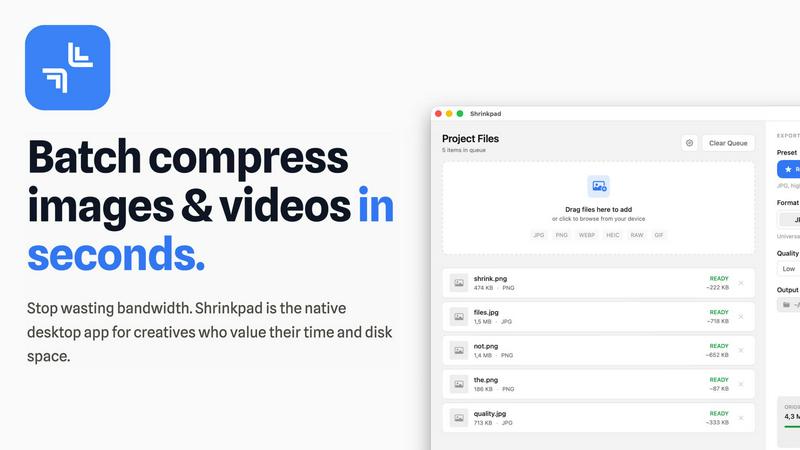
Shrinkpad allows you to drag and drop entire folders filled with images and videos for batch processing. This feature dramatically reduces the time spent on individual file compression, handling everything in seconds rather than hours.
Local Processing
With Shrinkpad, all your files are processed locally on your Mac. This means no uploads, no cloud dependencies, and complete privacy. Your sensitive assets remain on your device, giving you peace of mind.
Format Support
The app supports over 50 file formats, including popular image formats like JPG, PNG, and HEIC, as well as video formats such as MP4 and MOV. You can compress a variety of media types without worrying about compatibility issues.
Customization Options
Shrinkpad provides extensive customization options to fit your workflow. You can choose from quality presets, manually adjust compression settings, and even create custom file naming patterns. This allows for tailored outputs based on your specific needs.
Use Cases
Before After Photo Maker
Fitness Transformations
Fitness trainers and enthusiasts can utilize Before After Photo Maker to document and showcase their physical transformations or client progress. This visual documentation can serve as motivation for others and as a marketing tool for personal trainers.
Home Renovation Projects
Homeowners and contractors can use the tool to present dramatic renovations and improvements. By showcasing before and after images, they can effectively communicate their work's impact, making it an excellent resource for portfolios or social media.
Beauty and Skincare Results
Beauty professionals can utilize the tool to highlight the effectiveness of skincare regimens or cosmetic treatments. By presenting before and after images, they can build trust with potential clients and demonstrate the results of their services.
Digital Art and Creative Projects
Artists can leverage Before After Photo Maker to showcase their creative processes, from initial sketches to final pieces. This is especially useful for game developers and digital artists who want to illustrate their growth and progression over time.
Shrinkpad
Photographer Workflow Optimization
Photographers can use Shrinkpad to quickly compress large batches of high-resolution images from a shoot. This not only saves storage space but also speeds up the process of preparing images for sharing or printing.
Web Development and Design
Web designers can benefit from Shrinkpad by optimizing images and videos before uploading them to websites. This leads to faster load times and improved user experience, essential for maintaining visitor engagement.
Content Creation for Social Media
Content creators can leverage Shrinkpad to compress video files for platforms like Instagram and YouTube. By maintaining high visual quality while reducing file sizes, creators can easily share their work without worrying about upload limits.
Team Collaboration in Studios
Small studios can utilize Shrinkpad to streamline their asset management. With the ability to batch process files and maintain quality, teams can collaborate effectively, ensuring that everyone has access to optimized media.
Overview
About Before After Photo Maker
Before After Photo Maker is an innovative online tool designed to help users create stunning before and after photo comparisons in just minutes. Whether you're a fitness enthusiast wanting to showcase your transformation, a home renovator eager to display your project before and after images, or an artist documenting the evolution of your digital creations, this tool is perfect for you. It offers a user-friendly interface that allows for seamless photo uploading via drag and drop, making it accessible for everyone, regardless of technical skill. With multiple comparison layouts such as side-by-side, interactive slider, split view, and vertical stack, users can choose the best format to highlight their transformations effectively. The main value proposition lies in its ability to deliver high-quality image exports and interactive video outputs without the need for complex software or registration, making it an indispensable resource for anyone looking to present visual changes compellingly.
About Shrinkpad
Shrinkpad is an innovative batch compression tool designed specifically for Mac users who want to efficiently manage their media files. It allows you to compress hundreds of images and videos simultaneously, ensuring that everything stays on your device for maximum privacy. With a focus on speed and efficiency, Shrinkpad utilizes native macOS frameworks to process files locally, eliminating the need for cloud uploads or slow server processing. This makes it ideal for photographers, designers, content creators, and anyone overwhelmed by bloated media files. By reducing file sizes by up to 90% without sacrificing quality, Shrinkpad helps you reclaim valuable disk space and optimize your workflow. Its user-friendly interface and powerful features make it an essential tool for anyone looking to streamline their media management.
Frequently Asked Questions
Before After Photo Maker FAQ
How do I upload my images?
You can easily upload your before and after images by using the drag and drop feature or by clicking the upload button. The tool supports formats such as PNG, JPG, and GIF, with a maximum file size of 10MB.
Do I need to create an account to use the tool?
No, Before After Photo Maker is completely free to use without the need for registration. You can start creating your photo comparisons immediately after accessing the site.
Can I customize the labels in my comparisons?
Absolutely! The tool allows you to add customizable labels to your photos, adjusting their size and radius to fit your needs. You can also include a company logo to enhance brand visibility.
What export options are available?
You can export your completed comparisons in high-quality image formats or as interactive videos. This versatility ensures that your final product is suitable for various platforms, whether for online sharing or professional presentations.
Shrinkpad FAQ
Can I use Shrinkpad for free?
Yes, Shrinkpad offers a Free Starter plan that includes essential tools for casual use, allowing you to compress up to 10 files per batch with standard compression.
What file formats does Shrinkpad support?
Shrinkpad supports over 50 formats out of the box, including JPG, PNG, HEIC, WEBP for images, and MP4, MOV for videos, ensuring compatibility with a wide range of media types.
Does Shrinkpad support video compression?
Absolutely! Shrinkpad allows users to compress video files alongside images, making it an all-in-one solution for managing various media formats efficiently.
Can I control the compression quality?
Yes, Shrinkpad offers both automatic and manual compression settings. You can choose from quality presets or fine-tune the compression parameters to achieve the desired balance between file size and visual quality.
Alternatives
Before After Photo Maker Alternatives
Before After Photo Maker is an innovative online tool designed to help users create stunning before-and-after photo comparisons effortlessly. As part of the Image & Photo category, it caters to diverse needs, from fitness transformations to home renovations and artistic progressions. Users often seek alternatives due to factors such as pricing, specific feature sets, platform compatibility, or the need for additional customization options. Finding the right alternative involves assessing the required layouts, ease of photo uploads, and any unique functionalities that may enhance the overall user experience. When searching for an alternative, it’s essential to consider features that align with your goals, such as various display formats like side-by-side comparisons or interactive sliders. Additionally, ensure that the platform you choose offers a user-friendly interface, robust photo upload capabilities, and the flexibility to showcase your transformations in the most impactful way possible. By evaluating these factors, you can find a solution that meets your creative needs and enhances your presentation of before-and-after visuals.
Shrinkpad Alternatives
ShrinkPad is an innovative batch compression tool designed specifically for Mac users, allowing them to effortlessly compress images and videos without sacrificing quality. It stands out in the image and video processing category by offering a seamless drag-and-drop experience, ensuring that users can quickly reduce file sizes while keeping their media files secure and private. However, users often seek alternatives to ShrinkPad for various reasons, including pricing, desired features, or platform compatibility. When looking for an alternative, it's essential to consider factors such as ease of use, the range of supported formats, customization options, and the level of privacy offered. A reliable alternative should meet specific needs while providing a user-friendly experience.