
BudgetSheet vs ConvertBankToExcel

BudgetSheet
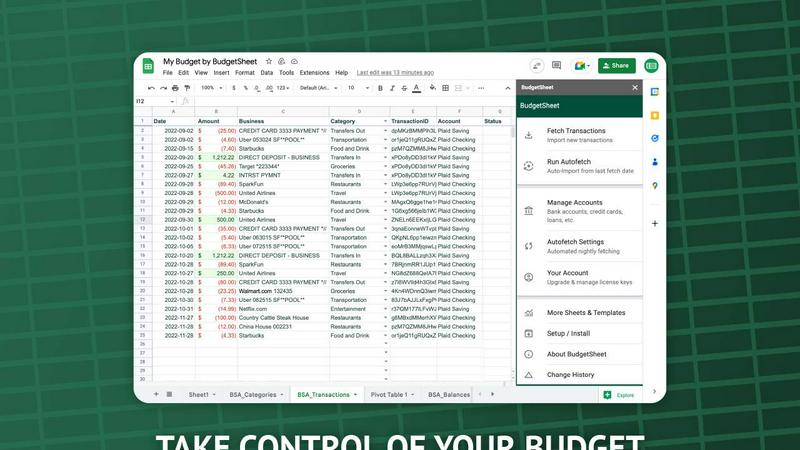
BudgetSheet effortlessly imports your bank transactions into Google Sheets, automating budgeting like never before.
Last updated: February 28, 2026

ConvertBankToExcel
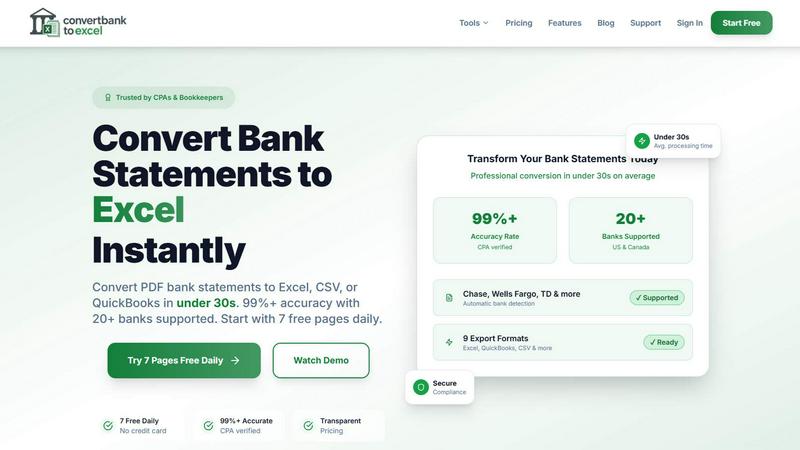
Effortlessly convert bank PDFs to Excel or CSV in under 30 seconds with 99% accuracy, trusted by professionals.
Last updated: February 28, 2026
Visual Comparison
BudgetSheet
ConvertBankToExcel
Feature Comparison
BudgetSheet
Live Bank Transactions
BudgetSheet allows users to connect their bank accounts securely and import live transactions directly into Google Sheets. This feature eliminates the need for manual data entry, ensuring that your financial records are always up to date and accurate.
Supports 10,000+ Financial Institutions
Whether you have a checking account, savings account, credit card, or investment account, BudgetSheet supports over 10,000 financial institutions. This extensive compatibility means you can manage all your financial data from one centralized location.
Secure Connections with Plaid
BudgetSheet utilizes Plaid to facilitate secure connections to your financial institutions. This means that your sensitive login credentials are never stored or handled by BudgetSheet, providing peace of mind when linking your bank accounts.
Custom Automation with Google Sheets
One of the standout features of BudgetSheet is the ability to automate your budgeting processes using Google Sheets' custom scripts and tools like Zapier. This flexibility allows you to create personalized solutions tailored to your financial needs.
ConvertBankToExcel
99%+ Accuracy Rate
ConvertBankToExcel boasts a CPA-verified accuracy rate of over 99%, ensuring that the extracted transaction data from bank statements is reliable and precise. This level of accuracy minimizes errors that can occur with manual data entry, providing peace of mind for accounting professionals.
Fast Processing Time
Time is money, especially in the world of accounting. ConvertBankToExcel processes bank statements in under 30 seconds on average, allowing users to convert multiple files quickly and efficiently. This rapid turnaround time significantly improves productivity, enabling accountants to focus on higher-value tasks.
Multiple Export Formats
With support for nine different export formats, including Excel, CSV, and various QuickBooks formats (QBO, QFX, OFX, and IIF), ConvertBankToExcel provides flexibility for users to import their data into any accounting software seamlessly. This versatility is tailored to meet the diverse needs of accounting professionals.
AI-Powered OCR Technology
The platform utilizes advanced AI-powered Optical Character Recognition (OCR) technology to handle both digital and scanned PDFs. This means that users can convert statements from a variety of sources, ensuring that even scanned documents are accurately transformed into usable data.
Use Cases
BudgetSheet
Personal Budgeting
BudgetSheet is ideal for individuals who want to create tailored budgets. By automatically importing transactions, users can easily track their income and expenses, ensuring they stay within their financial limits.
Small Business Financial Management
Small business owners can benefit from BudgetSheet by using it to monitor business expenses and revenues. The automation features help streamline financial reporting, making it easier to prepare for taxes or audits.
Investment Tracking
For those managing investment accounts, BudgetSheet offers a straightforward way to keep track of transactions and portfolio performance. Users can analyze their investments directly in Google Sheets, allowing for informed decision-making.
Family Budget Coordination
Families can use BudgetSheet to coordinate finances by sharing a single Google Sheet. This enables all family members to easily view and contribute to the family budget, promoting transparency and collaboration in financial planning.
ConvertBankToExcel
Tax Preparation
During tax season, accounting professionals can use ConvertBankToExcel to quickly gather and organize financial statements, ensuring compliance with IRS requirements. This tool simplifies the process of preparing documents for tax filing, saving valuable time and effort.
Mortgage Applications
ConvertBankToExcel is an essential tool for preparing organized bank statements required by mortgage lenders. By providing clear and accurate financial information, accountants can expedite the approval process for their clients' mortgage applications.
Visa Applications
When applying for visas or immigration, applicants often need to submit detailed financial statements. ConvertBankToExcel enables users to convert bank statements swiftly, ensuring they meet the financial documentation requirements set by embassies or immigration offices.
Batch Processing for Multiple Files
For firms handling numerous client accounts, ConvertBankToExcel's batch processing feature allows users to convert multiple bank statements simultaneously. This capability streamlines workflows, making it easier to manage high volumes of documents without sacrificing accuracy.
Overview
About BudgetSheet
BudgetSheet is a powerful Google Sheets add-on designed to streamline your financial management by importing live bank transactions directly into your spreadsheets. Gone are the days of tedious manual exports and cumbersome CSV files. With BudgetSheet, you can easily link to over 10,000 financial institutions, including checking accounts, savings accounts, credit cards, investment accounts, loans, and mortgages. This tool is perfect for anyone looking to take control of their personal finances, from budgeting enthusiasts to busy professionals seeking an efficient way to track expenses. By harnessing the secure connectivity of Plaid, BudgetSheet ensures that your sensitive data remains safe while providing you with a user-friendly interface to manage your finances. With BudgetSheet, you gain full autonomy over your budgeting process, allowing you to customize your spreadsheets to fit your unique financial goals and strategies.
About ConvertBankToExcel
ConvertBankToExcel is a revolutionary AI-powered platform designed specifically for accounting professionals who seek to streamline their workflow and eliminate the tedious task of manual data entry. This innovative tool automatically extracts transaction data from PDF bank statements, transforming them into easily accessible formats such as Excel, CSV, and various QuickBooks formats in under 30 seconds. With a remarkable accuracy rate of over 99%, verified by CPAs, ConvertBankToExcel is trusted by more than 50,000 CPAs, bookkeepers, and accounting experts. The platform supports over 20 major US and Canadian banks, ensuring seamless integration with the financial systems that professionals rely on. With a free tier offering daily conversions, ConvertBankToExcel empowers users to focus on what truly matters—providing value to their clients and enhancing their productivity.
Frequently Asked Questions
BudgetSheet FAQ
How does BudgetSheet ensure my bank data is secure?
BudgetSheet uses Plaid for secure bank connections, meaning your bank login credentials are never stored or handled by BudgetSheet. All sensitive data is encrypted, ensuring your information remains safe.
Can I try BudgetSheet before purchasing?
Absolutely! BudgetSheet offers a 15-day free trial with no credit card required. This allows you to explore all features and see how it fits your financial management needs.
What types of accounts can I connect with BudgetSheet?
BudgetSheet supports a wide range of account types, including checking accounts, savings accounts, credit cards, investment accounts, and loans. You can check the list of supported banks to see if yours is included.
Is BudgetSheet easy to set up?
Yes! Setting up BudgetSheet is straightforward. Simply enable the add-on in Google Sheets, link your bank accounts, and start importing transactions. The user-friendly interface makes it accessible for everyone, regardless of tech-savviness.
ConvertBankToExcel FAQ
How does ConvertBankToExcel ensure data security?
ConvertBankToExcel employs bank-grade encryption to protect sensitive financial information during the conversion process. Additionally, all uploaded documents are automatically deleted after 24 hours to enhance user privacy and data security.
Can I convert scanned bank statements?
Yes! ConvertBankToExcel's advanced AI-powered OCR technology allows for the conversion of both digital and scanned PDF bank statements. This feature ensures that users can work with a variety of document types without hassle.
What types of banks are supported?
ConvertBankToExcel supports over 20 major US and Canadian banks, including Chase, Bank of America, Wells Fargo, and TD Bank. This extensive support ensures that users can convert statements from the financial institutions they utilize.
Is there a free trial available?
Absolutely! ConvertBankToExcel offers a free tier that allows users to convert up to 7 pages daily without requiring a credit card. This gives new users an opportunity to experience the platform's capabilities before committing to a paid plan.
Alternatives
BudgetSheet Alternatives
BudgetSheet is an innovative tool designed to streamline your personal finance management by integrating live bank transactions directly into Google Sheets. It eliminates the hassle of manual exports and tedious copy-pasting from CSV files, making financial tracking easier and more efficient than ever. Users typically seek alternatives to BudgetSheet for various reasons, including pricing structures, specific feature sets, or compatibility with different platforms. When searching for an alternative, consider what functionalities are essential for your financial management needs. Look for seamless integrations, user-friendly interfaces, and robust automation features that can enhance your budgeting experience while fitting your unique requirements.
ConvertBankToExcel Alternatives
ConvertBankToExcel is an innovative AI-powered platform designed specifically for accounting professionals to convert bank PDFs into Excel or CSV formats swiftly and accurately. As a productivity and management tool, it streamlines the often tedious process of manual data entry, allowing users to focus on more critical tasks. Users frequently seek alternatives to ConvertBankToExcel for various reasons, including pricing, specific feature sets, or particular platform compatibility. When searching for an alternative, it's essential to evaluate factors such as accuracy rates, processing speed, security measures, and customer support to ensure the chosen solution meets your unique accounting needs and enhances productivity.