
Blueberry vs CloudBurn

Blueberry
Blueberry is the all-in-one workspace for AI-driven web app development and delivery.
Last updated: February 27, 2026

CloudBurn
CloudBurn reveals AWS infrastructure costs in pull requests, preventing costly surprises before deployment.
Last updated: February 28, 2026
Visual Comparison
Blueberry
CloudBurn

Feature Comparison
Blueberry
Integrated Workspace
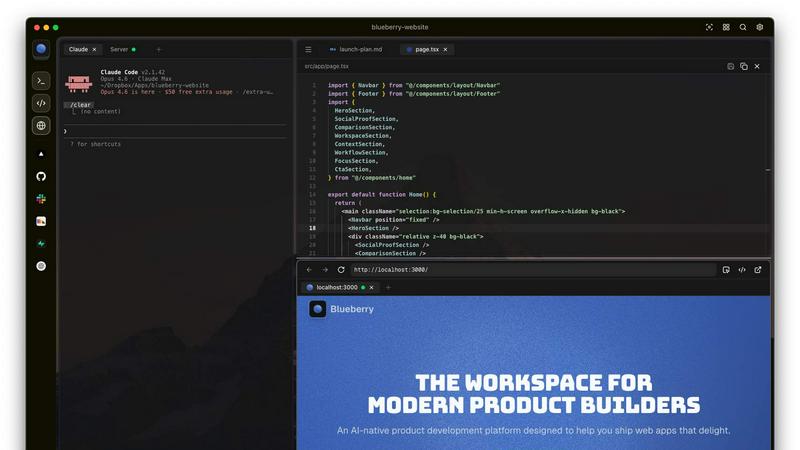
Blueberry combines a terminal, code editor, and preview browser into a single workspace, eliminating the need to switch between applications. This integration enables a fluid workflow where all your tools are accessible in one place, enhancing productivity and focus.
Contextual AI Interaction
With Blueberry's built-in MCP server, your AI can interact with the entire workspace. It has full context of your code, browser, and running apps, allowing it to provide intelligent suggestions and insights based on your current project state.
Pinned Apps
Keep essential tools like GitHub, Linear, Figma, and PostHog docked inside your Blueberry workspace. These pinned apps load alongside your project, sharing live context with your AI and providing a cohesive development experience without interruptions.
Screenshot & Element Selection
Blueberry allows you to capture screenshots or select elements directly from the preview browser, giving your AI visual context. This feature enhances the ability to provide feedback and suggestions based on actual interface elements, making development more intuitive.
CloudBurn
Automatic Cost Analysis
CloudBurn delivers automatic cost analysis on every infrastructure pull request, ensuring that all changes are evaluated for their financial impact. This feature allows developers to see the cost implications of their code changes before deployment, promoting cost-conscious decision-making.
Real-Time AWS Pricing
CloudBurn utilizes real-time AWS pricing tailored to your specific region, ensuring that the cost estimates provided are accurate and reflective of the current market. This means you can trust the figures you see, enabling you to make informed choices about your infrastructure.
Resource-Level Cost Breakdown
With CloudBurn, you receive a detailed resource-level breakdown that compares old and new monthly costs. This granular insight allows teams to pinpoint which specific changes will result in financial increases, making it easier to adjust plans or configurations accordingly.
Integration with GitHub Workflow
CloudBurn integrates seamlessly with your existing GitHub workflow, making setup a breeze. With just a few steps, teams can enable automated cost analysis for every pull request, streamlining the process of monitoring and managing cloud infrastructure expenses.
Use Cases
Blueberry
Collaborative Development
Teams can use Blueberry to streamline collaboration by keeping all project files, discussions, and design tools in one integrated workspace. This fosters real-time communication and reduces the time spent switching between different applications.
Rapid Prototyping
Developers can quickly prototype web applications using Blueberry's live preview feature. As you code, you can instantly see changes reflected in the browser, allowing for faster iterations and a more efficient development cycle.
Enhanced Debugging
With a terminal that provides live output and context-aware AI support, debugging becomes a more manageable task. Blueberry helps identify issues in real-time, enabling developers to fix bugs faster and improve overall code quality.
Educational Tool for Developers
Blueberry serves as an excellent educational platform for new developers. By providing integrated tools and contextual AI support, learners can receive immediate assistance while coding, making the learning process more engaging and effective.
CloudBurn
Cost Management for Development Teams
Development teams can use CloudBurn to manage infrastructure costs effectively. By integrating cost analysis into the pull request process, teams can identify potential budget overruns before they occur, leading to more predictable financial planning.
Preventing Costly Production Mistakes
CloudBurn helps prevent costly mistakes from reaching production. By showing real-time cost estimates during the code review phase, teams can adjust their infrastructure changes before they become live, safeguarding against unexpected expenses.
Enhancing Financial Accountability
With CloudBurn's detailed cost reporting, teams can foster a culture of financial accountability. Developers can see the cost impact of their work, encouraging more mindful resource utilization and promoting a shared responsibility for cloud spending.
Streamlining CI/CD Workflows
CloudBurn enhances CI/CD workflows by integrating cost insights into the development pipeline. This automation saves time and effort for teams, allowing them to focus on building innovative solutions without the worry of spiraling costs.
Overview
About Blueberry
Blueberry is a revolutionary macOS application designed for modern product builders, seamlessly integrating your code editor, terminal, and browser into one focused workspace. Gone are the days of juggling multiple windows and losing context; Blueberry allows developers to focus on what truly matters—building exceptional web applications. With its AI-native capabilities, Blueberry connects to powerful models such as Claude, Codex, and Gemini via its built-in MCP server. This means your AI can see your files, understand terminal output, and provide live previews, all while you work. It's tailored for developers, designers, and product managers who want to streamline their workflow and enhance productivity. Experience the future of development with Blueberry, where your tools work together in harmony to help you ship web apps that delight users.
About CloudBurn
CloudBurn is an innovative solution designed for teams using Terraform or AWS CDK who want to avoid costly infrastructure mistakes before they reach the production stage. Often, teams find themselves facing unpleasant surprises on their AWS bills weeks after deploying changes, by which time the infrastructure is already in place, and money has been spent. CloudBurn disrupts this cycle by providing real-time cost estimates during the code review process. When a developer opens a pull request with infrastructure modifications, CloudBurn automatically analyzes these changes using current AWS pricing data. This allows teams to see a detailed cost report right in their pull request, enabling informed discussions about costs before deployment. With CloudBurn, teams can catch expensive decisions early, ensuring that budget overruns are avoided and financial efficiency is maintained throughout the development lifecycle.
Frequently Asked Questions
Blueberry FAQ
What is Blueberry?
Blueberry is a macOS application that integrates your code editor, terminal, and browser into one workspace, enhancing productivity for modern product builders.
How does Blueberry improve workflow?
By combining essential development tools into a single workspace, Blueberry minimizes the need to switch between applications, allowing developers to focus more on coding and less on managing multiple windows.
Is Blueberry suitable for team collaboration?
Absolutely! Blueberry's integrated workspace and pinned apps facilitate effective collaboration among team members, ensuring everyone has access to the same tools and context.
When will Blueberry be available after the beta period?
While specific details about the post-beta period are not yet available, Blueberry is currently 100% free during its beta phase, allowing users to explore its features without any financial commitment.
CloudBurn FAQ
How does CloudBurn analyze cost changes?
CloudBurn analyzes cost changes by automatically examining the pull request's infrastructure modifications and comparing them against real-time AWS pricing data. This analysis provides an accurate cost estimate for each change.
Can CloudBurn be used with any AWS service?
Yes, CloudBurn is designed to work with various AWS services through Terraform and AWS CDK. It provides cost analysis for a wide range of resources, helping teams gain visibility into their cloud spending.
Is there a trial period for CloudBurn?
Yes, CloudBurn offers a 14-day Pro trial that allows users to experience all the premium features for free. Users can cancel at any time or continue using the Community plan indefinitely.
How secure is CloudBurn?
CloudBurn prioritizes security by handling billing, setup, and permissions entirely through GitHub. This ensures that user data and infrastructure configurations are managed securely within a trusted environment.
Alternatives
Blueberry Alternatives
Blueberry is a cutting-edge macOS application designed to streamline the product building process by integrating your editor, terminal, and browser into a single focused workspace. This innovative tool falls within the Dev Tools category, catering to developers and creators looking to enhance their workflow and productivity. Users often seek alternatives to Blueberry for various reasons, such as exploring more competitive pricing, discovering additional features, or finding solutions that better align with their specific platform needs. When searching for an alternative to Blueberry, it’s essential to consider several factors, including the ease of integration with your current tools, the range of features offered, and the overall user experience. Look for options that enhance your workflow without adding unnecessary complexity, ensuring that you can maintain your focus and productivity just like you would with Blueberry.
CloudBurn Alternatives
CloudBurn is an innovative tool designed for teams leveraging Terraform or AWS CDK, enabling them to see potential infrastructure costs during code reviews rather than waiting for the unpleasant surprise on their bill. This product falls into the Dev Tools category, focusing on cost management and infrastructure optimization. Users often seek alternatives to CloudBurn for various reasons, including pricing considerations, specific feature sets, or platform compatibility that better fits their workflow. When choosing an alternative, it’s essential to evaluate the tool’s ability to deliver real-time cost analysis, the granularity of the cost breakdown it provides, and how seamlessly it integrates into existing workflows. Look for solutions that prioritize proactive cost management and enhance team collaboration during the development process, ensuring that potential issues are addressed before deployment.