
ConvertBankToExcel vs Dividend Data

ConvertBankToExcel
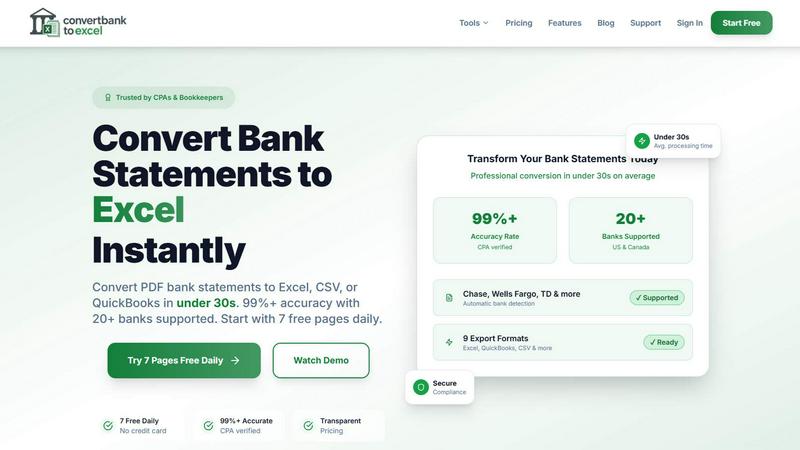
Effortlessly convert bank PDFs to Excel or CSV in under 30 seconds with 99% accuracy, trusted by professionals.
Last updated: February 28, 2026

Dividend Data
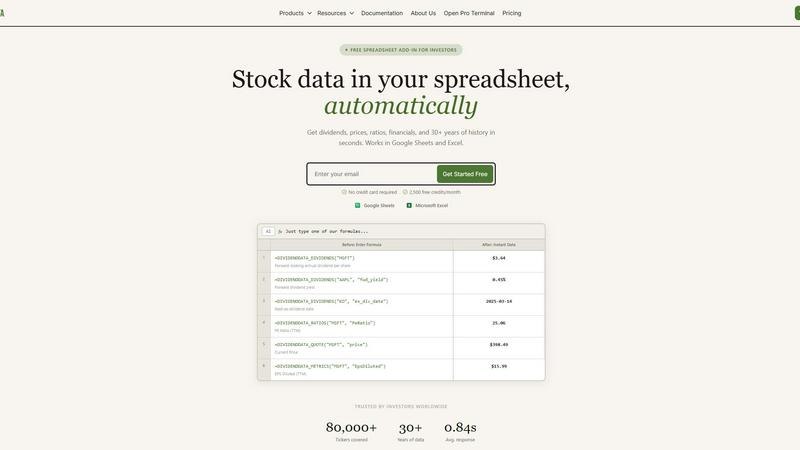
Get instant stock data like dividends and prices automatically in your Google Sheets or Excel.
Last updated: March 11, 2026
Visual Comparison
ConvertBankToExcel
Dividend Data
Feature Comparison
ConvertBankToExcel
99%+ Accuracy Rate
ConvertBankToExcel boasts a CPA-verified accuracy rate of over 99%, ensuring that the extracted transaction data from bank statements is reliable and precise. This level of accuracy minimizes errors that can occur with manual data entry, providing peace of mind for accounting professionals.
Fast Processing Time
Time is money, especially in the world of accounting. ConvertBankToExcel processes bank statements in under 30 seconds on average, allowing users to convert multiple files quickly and efficiently. This rapid turnaround time significantly improves productivity, enabling accountants to focus on higher-value tasks.
Multiple Export Formats
With support for nine different export formats, including Excel, CSV, and various QuickBooks formats (QBO, QFX, OFX, and IIF), ConvertBankToExcel provides flexibility for users to import their data into any accounting software seamlessly. This versatility is tailored to meet the diverse needs of accounting professionals.
AI-Powered OCR Technology
The platform utilizes advanced AI-powered Optical Character Recognition (OCR) technology to handle both digital and scanned PDFs. This means that users can convert statements from a variety of sources, ensuring that even scanned documents are accurately transformed into usable data.
Dividend Data
Instant Spreadsheet Integration
Access over 100 critical metrics directly in your cells with 16 simple custom formulas. Whether you need the next ex-dividend date for Coca-Cola or the current P/E ratio for Microsoft, just type a function like =DIVIDENDDATA_QUOTE("MSFT", "price") and get live, updating data in under a second. It works seamlessly in both Google Sheets and Excel, turning your spreadsheet into a dynamic, connected research platform without any coding required.
Comprehensive Dividend & Fundamental Data
Go beyond simple quotes with 30+ years of deep historical data tailored for serious analysis. Get forward dividends, yields, payout ratios, and dividend growth rates. Dive into complete financial statements, earnings reports, and essential valuation and profitability ratios. This feature provides the complete picture for evaluating a company's financial health and income potential over the long term.
Generous Free Tier with Perpetual Access
Jumpstart your analysis immediately with no credit card required. The free plan offers 2,500 credits every month, and crucially, it never expires. This allows you to thoroughly test the platform, build complex models, and perform significant research without any time pressure or trial period limitations, making professional data truly accessible.
Multi-Platform Terminal & AI Tools
Beyond spreadsheets, access the flagship Dividend Data Terminal web-app. It features advanced data visualizations, automated portfolio tracking, and an AI-powered research assistant. This ecosystem approach means you can conduct deep, exploratory research in the Terminal and seamlessly implement the findings in your live spreadsheet models, all within one connected platform.
Use Cases
ConvertBankToExcel
Tax Preparation
During tax season, accounting professionals can use ConvertBankToExcel to quickly gather and organize financial statements, ensuring compliance with IRS requirements. This tool simplifies the process of preparing documents for tax filing, saving valuable time and effort.
Mortgage Applications
ConvertBankToExcel is an essential tool for preparing organized bank statements required by mortgage lenders. By providing clear and accurate financial information, accountants can expedite the approval process for their clients' mortgage applications.
Visa Applications
When applying for visas or immigration, applicants often need to submit detailed financial statements. ConvertBankToExcel enables users to convert bank statements swiftly, ensuring they meet the financial documentation requirements set by embassies or immigration offices.
Batch Processing for Multiple Files
For firms handling numerous client accounts, ConvertBankToExcel's batch processing feature allows users to convert multiple bank statements simultaneously. This capability streamlines workflows, making it easier to manage high volumes of documents without sacrificing accuracy.
Dividend Data
Building a Dividend Growth Model
Easily screen and model dividend aristocrats and kings. Use functions to pull decades of dividend history and growth rates directly into your spreadsheet to calculate Chowder Numbers, analyze payout safety through ratios, and forecast future income. Automate your entire screening process to identify the most reliable long-term income stocks without manual data entry.
Creating a Live Portfolio Dashboard
Construct a master portfolio tracker that updates in real-time. Link cells to pull current prices, dividend yields, and annual income for each holding. Aggregate totals to see your portfolio's overall yield, projected income, and daily value change automatically, giving you a constantly up-to-date snapshot of your investments.
Conducting Comparative Company Analysis
Quickly pull key financial ratios and metrics for multiple companies side-by-side. Compare P/E ratios, debt-to-equity, profit margins, and revenue growth across an entire sector directly in a single sheet. This allows for fast, data-driven investment thesis development and peer group benchmarking.
Automating Financial Statement Analysis
Streamline deep dives into company fundamentals. Use formulas to import entire income statements, balance sheets, and cash flow statements over multiple years. Calculate custom ratios, track trends in revenue and EPS, and assess financial health automatically, saving hours of manual data collection and formatting.
Overview
About ConvertBankToExcel
ConvertBankToExcel is a revolutionary AI-powered platform designed specifically for accounting professionals who seek to streamline their workflow and eliminate the tedious task of manual data entry. This innovative tool automatically extracts transaction data from PDF bank statements, transforming them into easily accessible formats such as Excel, CSV, and various QuickBooks formats in under 30 seconds. With a remarkable accuracy rate of over 99%, verified by CPAs, ConvertBankToExcel is trusted by more than 50,000 CPAs, bookkeepers, and accounting experts. The platform supports over 20 major US and Canadian banks, ensuring seamless integration with the financial systems that professionals rely on. With a free tier offering daily conversions, ConvertBankToExcel empowers users to focus on what truly matters—providing value to their clients and enhancing their productivity.
About Dividend Data
Dividend Data is the revolutionary toolkit that transforms your everyday spreadsheet into a professional-grade investment research terminal. Built by a dividend investor for dividend investors, it eliminates the tedious, error-prone process of manually copying and pasting stock data. With over 30 years of historical market data for more than 80,000 tickers, it brings institutional-quality financial intelligence directly into the tools you already use: Google Sheets and Microsoft Excel. The magic happens through simple, custom formulas. Just type =DIVIDENDDATA_DIVIDENDS("MSFT") and watch the forward annual dividend appear instantly. No API keys, no complex coding, and no more jumping between browser tabs. It’s designed for fundamental and dividend investors who demand deep data—dividends, yields, payout ratios, growth rates, full financial statements, key ratios, and price history—without the institutional price tag. Start with a powerful free tier offering 2,500 monthly credits that never expire, and experience the future of streamlined, data-driven investing today.
Frequently Asked Questions
ConvertBankToExcel FAQ
How does ConvertBankToExcel ensure data security?
ConvertBankToExcel employs bank-grade encryption to protect sensitive financial information during the conversion process. Additionally, all uploaded documents are automatically deleted after 24 hours to enhance user privacy and data security.
Can I convert scanned bank statements?
Yes! ConvertBankToExcel's advanced AI-powered OCR technology allows for the conversion of both digital and scanned PDF bank statements. This feature ensures that users can work with a variety of document types without hassle.
What types of banks are supported?
ConvertBankToExcel supports over 20 major US and Canadian banks, including Chase, Bank of America, Wells Fargo, and TD Bank. This extensive support ensures that users can convert statements from the financial institutions they utilize.
Is there a free trial available?
Absolutely! ConvertBankToExcel offers a free tier that allows users to convert up to 7 pages daily without requiring a credit card. This gives new users an opportunity to experience the platform's capabilities before committing to a paid plan.
Dividend Data FAQ
How does the free tier work?
The free tier provides 2,500 credits every month, which renew automatically. There is no expiration date or trial period; you can use the free plan indefinitely. Credits are used each time a spreadsheet function recalculates and fetches fresh data from our servers, allowing for substantial usage for personal analysis and modeling.
What data can I access with the spreadsheet functions?
You can access over 100 metrics spanning dividends, quotes, financial ratios, and fundamental data. This includes forward and historical dividends, yield, ex-dividend dates, current price, volume, P/E ratio, EPS, revenue, EBITDA, and much more. Full documentation lists all available functions and their parameters.
Do I need to install software?
For Google Sheets, you install an Add-on from the Google Workspace Marketplace. For Microsoft Excel, you install an Add-in from Microsoft AppSource. Both processes are quick and guided. Once installed, the custom functions are available in your spreadsheet just like native formulas, with no separate software to run.
Is my data and portfolio information secure?
Yes. Dividend Data uses secure, encrypted connections for all data transmission. Your portfolio data and API usage are kept private. The company does not sell your personal data or investment information. You can review the full details in the Privacy Policy available on the website.
Alternatives
ConvertBankToExcel Alternatives
ConvertBankToExcel is an innovative AI-powered platform designed specifically for accounting professionals to convert bank PDFs into Excel or CSV formats swiftly and accurately. As a productivity and management tool, it streamlines the often tedious process of manual data entry, allowing users to focus on more critical tasks. Users frequently seek alternatives to ConvertBankToExcel for various reasons, including pricing, specific feature sets, or particular platform compatibility. When searching for an alternative, it's essential to evaluate factors such as accuracy rates, processing speed, security measures, and customer support to ensure the chosen solution meets your unique accounting needs and enhances productivity.
Dividend Data Alternatives
Dividend Data is an automatic stock data platform that brings institutional-grade financial data directly into your spreadsheets. It falls into the category of financial data tools designed for self-directed investors, specifically those focused on dividends and fundamental analysis. It turns Google Sheets and Excel into powerful, live research terminals with simple formulas. Users often explore alternatives for a few key reasons. They might need a different pricing model, require specific data points or integrations not offered, or need a solution that works on a different platform entirely. Some may seek more advanced analytical tools or a different user experience beyond the spreadsheet environment. When evaluating any tool in this space, focus on your core needs. Consider the depth and history of the data, the reliability and update frequency, the total cost, and how seamlessly it fits into your existing workflow. The best choice is the one that gives you accurate, actionable data with the least amount of friction, letting you focus on analysis instead of data collection.