
Invoice Guru vs ProcessBankStatement

Invoice Guru
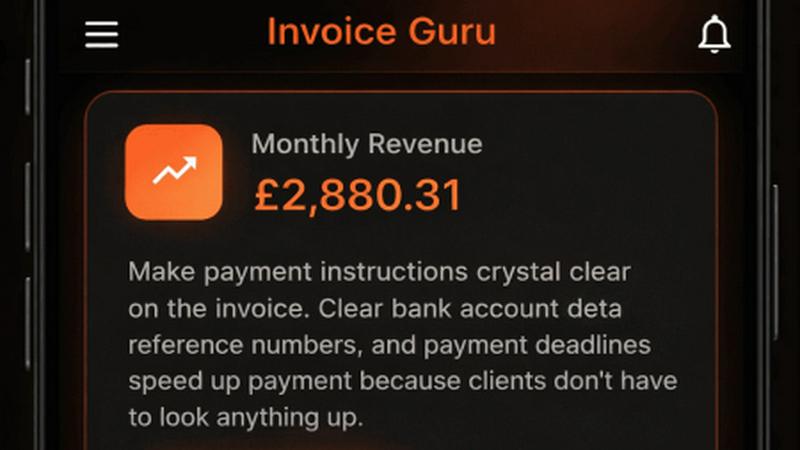
Create professional invoices in under 60 seconds with Invoice Guru, the ultimate HMRC-compliant tool for UK.
Last updated: February 28, 2026

ProcessBankStatement
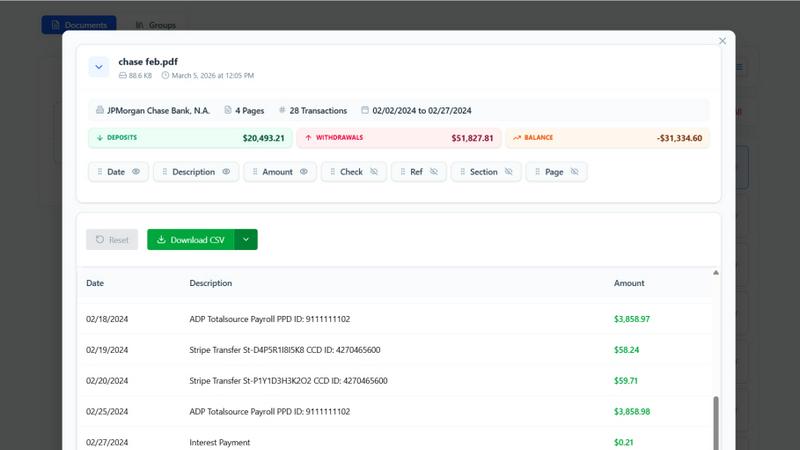
Convert your PDF bank statements to clean CSVs in seconds with ProcessBankStatement—fast, secure, and hassle-free data extraction.
Last updated: March 11, 2026
Visual Comparison
Invoice Guru
ProcessBankStatement
Feature Comparison
Invoice Guru
Instant Invoice Creation
Create and send a professional invoice in less than a minute. Just enter your client’s details, add items, and Invoice Guru automatically includes your logo, VAT, payment terms, and due dates. This speed ensures that you can focus on your work while managing your invoicing efficiently.
Automatic Invoice Numbering
Invoices are systematically numbered and dated based on your fiscal year settings, eliminating the hassle of manual tracking. This feature ensures that your invoices are organized and compliant, making it easier for you and your accountant to manage records.
OCR Receipt Scanner (AI)
Simply snap a photo of your receipts, and Invoice Guru’s AI technology will read all necessary details, saving them as expense entries. This eliminates the tedious task of manual data entry, allowing you to keep your financial records accurate and up-to-date effortlessly.
Smart Payment Tracking
With smart payment tracking, Invoice Guru automatically matches incoming bank transactions with unpaid invoices. You will receive notifications about which clients have paid and which invoices are overdue, helping you maintain a clear view of your cash flow.
ProcessBankStatement
Fast & Effortless Data Conversion
With ProcessBankStatement, users can upload their PDF bank statements and receive clean, structured CSV data in seconds. There is no complicated setup or time-consuming processes involved. The streamlined workflow allows users to focus on what matters most instead of getting bogged down with manual entries.
Enhanced Security & Privacy
Data security is a key feature of ProcessBankStatement. All uploaded files are encrypted during transit, ensuring that sensitive financial information remains safe from prying eyes. Users can also delete their files at any time, maintaining total control over their data and privacy.
Smart Data Extraction
The intelligent parsing engine of ProcessBankStatement is designed to accurately detect transactions and clean up formatting. This feature guarantees that the extracted data is structured and ready for immediate use in popular software like QuickBooks and Excel, making it easy to integrate into existing workflows.
Flexible Upload Options
ProcessBankStatement supports a variety of PDF file types, including multi-page and scanned documents. Users can easily upload their bank statements without needing to worry about special formatting, making the process as simple as drag and drop.
Use Cases
Invoice Guru
On-Site Invoicing for Tradespeople
Imagine finishing a job and needing to bill your client immediately. With Invoice Guru, tradespeople can create and send professional invoices right from their mobile devices while still on-site, ensuring prompt payment and satisfied clients.
Automated Expense Management
For small businesses juggling multiple expenses, Invoice Guru’s OCR receipt scanning feature allows users to effortlessly track costs without manual input. This facilitates better expense management and financial organization, saving precious time.
Compliance with Tax Regulations
As regulations evolve, keeping up can be a daunting task for small business owners. Invoice Guru’s built-in compliance features, including automatic updates for UK MTD and Poland’s KSeF, ensure businesses remain compliant without needing to switch tools or services.
Streamlined Client Communication
Invoice Guru enables users to send invoices instantly via email, accompanied by notifications when clients view or pay their bills. This feature streamlines communication and fosters prompt responses, enhancing client relationships and satisfaction.
ProcessBankStatement
Streamlined Bookkeeping
For accountants and bookkeepers, ProcessBankStatement offers a way to streamline the bookkeeping process. By converting multiple bank statements into structured CSV files, professionals can save significant time and reduce errors associated with manual data entry.
Efficient Financial Analysis
Financial analysts can leverage the power of ProcessBankStatement to quickly convert bank statements into usable data formats. This allows for rapid analysis, enabling them to derive insights and make informed decisions without the hassle of sorting through unstructured data.
Simplified Client Onboarding
Financial consultants can integrate ProcessBankStatement into their client onboarding process. Clients can easily upload their bank statements, and consultants receive immediate access to structured data, enhancing efficiency and improving service delivery.
Hassle-Free Tax Preparation
During tax season, individuals and small business owners can use ProcessBankStatement to convert their bank statements into clean CSV files. This simplifies the tax preparation process, making it easier to gather necessary financial information and reducing the stress of meeting tax deadlines.
Overview
About Invoice Guru
Invoice Guru is a groundbreaking mobile-first invoicing application specifically designed for tradespeople and small service businesses. Unlike typical invoicing tools that cater to desktop environments, Invoice Guru empowers professionals on the go — from painters to plumbers and electricians — to swiftly generate and send invoices directly from their smartphones. The app's core focus is on speed, simplicity, and real-world automation, allowing users to create invoices in mere seconds, track payment statuses, and minimize administrative tasks. Features like automatic accountant reports, seamless bank integration for payment matching, and OCR receipt scanning for expenses significantly reduce manual work. Furthermore, Invoice Guru stays ahead of regulatory requirements, ensuring compliance with upcoming regulations, including UK MTD and Poland’s KSeF. This unique tool is crafted by a tradesperson who understands the daily hurdles of running a small business, making it a perfect fit for those who need reliable invoicing solutions without the complexities of traditional accounting software.
About ProcessBankStatement
ProcessBankStatement is an innovative tool designed to transform the way individuals and businesses handle their financial data. It simplifies the tedious task of manual data entry by allowing users to upload any PDF bank statement and instantly receive a downloadable CSV file. This service is perfect for accountants, small business owners, financial consultants, and anyone who needs a quick and efficient way to manage bank statements. With support for major U.S. banks such as Chase, Bank of America, and Wells Fargo, the tool ensures comprehensive compatibility. Security is a top priority; all data is encrypted, and users maintain full control over their files, with the option to delete them at any time. ProcessBankStatement is not just a time-saver; it empowers users to focus on analysis rather than data entry, making financial management seamless and hassle-free.
Frequently Asked Questions
Invoice Guru FAQ
How long does it take to create an invoice using Invoice Guru?
Creating an invoice takes less than 60 seconds with Invoice Guru. Users can enter client details and items quickly, allowing for efficient invoicing right from their mobile devices.
Is Invoice Guru compliant with tax regulations?
Yes, Invoice Guru is designed with compliance in mind, including adherence to upcoming regulations such as UK MTD and Poland’s KSeF, ensuring that small businesses can confidently manage their invoicing without facing compliance issues.
Can I customize my invoices with my branding?
Absolutely! Invoice Guru allows users to add their logo, company name, address, and terms and conditions automatically on each invoice, enabling a professional and branded appearance for all client communications.
What types of payments can I accept through Invoice Guru?
Invoice Guru supports various payment methods, including bank transfers, PayPal, and Stripe payments, allowing businesses to cater to their clients' payment preferences seamlessly.
ProcessBankStatement FAQ
What file types are supported?
Currently, ProcessBankStatement supports PDF bank statements, which can be either text-based or scanned. This flexibility ensures that users can work with a wide variety of document types.
Can I upload scanned images or photos?
Yes! ProcessBankStatement fully supports scanned PDFs and image-based statements, allowing users to convert various formats without any issues.
Is there a free trial available?
Absolutely! Guests can process 3 pages per day for free, while registered users enjoy 5 pages per day without charge, making it easy to test the tool's capabilities before committing.
Is my data secure with ProcessBankStatement?
Yes, the security of your data is paramount. All files are encrypted during transmission, and users have complete control over their data, including the ability to delete files at any time for added peace of mind.
Alternatives
Invoice Guru Alternatives
Invoice Guru is an innovative mobile-first invoicing app tailored specifically for tradespeople and small service businesses. Designed for professionals who work on-site, such as painters, plumbers, and electricians, it enables users to create and send invoices in under 60 seconds. As a part of the business and finance category, it stands out for its speed, simplicity, and automation features that cater directly to the unique needs of its users. Many users seek alternatives to Invoice Guru for various reasons, including price, specific features, or compatibility with different platforms. When searching for an invoicing tool, it's essential to consider aspects like ease of use, mobile capabilities, compliance with local regulations, and support for payment tracking and expense management. Finding a solution that aligns with your business needs can significantly enhance your invoicing experience and streamline administrative tasks.
ProcessBankStatement Alternatives
ProcessBankStatement is an innovative tool designed for effortless data extraction from PDF bank statements, making it a valuable asset in the Business & Finance category. Users often seek alternatives due to factors such as pricing, desired features, or specific platform compatibility. When exploring options, it is essential to consider factors like data security, ease of use, and the ability to integrate with existing software solutions to ensure a seamless experience.