
Shrinkpad vs Video to GIF Converter

Shrinkpad
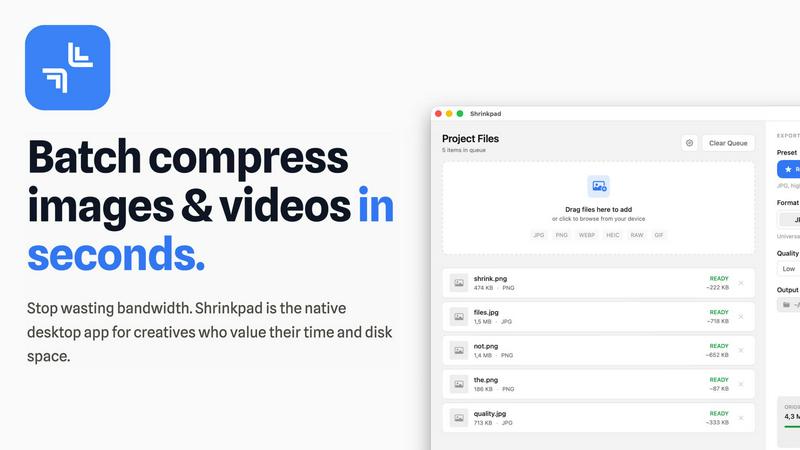
Effortlessly batch compress images and videos on Mac to save time, space, and improve performance with Shrinkpad.
Last updated: February 28, 2026

Video to GIF Converter
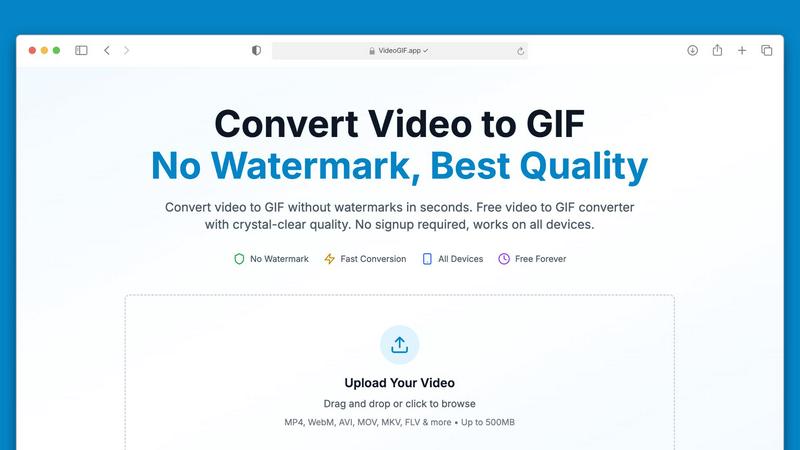
Effortlessly convert videos to high-quality GIFs in seconds, no watermarks ever.
Last updated: February 27, 2026
Visual Comparison
Shrinkpad
Video to GIF Converter
Feature Comparison
Shrinkpad
Batch Compression
Shrinkpad allows you to drag and drop entire folders filled with images and videos for batch processing. This feature dramatically reduces the time spent on individual file compression, handling everything in seconds rather than hours.
Local Processing
With Shrinkpad, all your files are processed locally on your Mac. This means no uploads, no cloud dependencies, and complete privacy. Your sensitive assets remain on your device, giving you peace of mind.
Format Support
The app supports over 50 file formats, including popular image formats like JPG, PNG, and HEIC, as well as video formats such as MP4 and MOV. You can compress a variety of media types without worrying about compatibility issues.
Customization Options
Shrinkpad provides extensive customization options to fit your workflow. You can choose from quality presets, manually adjust compression settings, and even create custom file naming patterns. This allows for tailored outputs based on your specific needs.
Video to GIF Converter
No Watermarks, Always Free
Say goodbye to watermarks! Our Video to GIF Converter guarantees that every GIF you create is completely watermark-free. You have full ownership of your GIFs, allowing you to use them commercially or personally without any restrictions or hidden fees.
Fast Video to GIF Conversion
Experience lightning-fast conversion speeds with our optimized processing technology. Most video files, including large ones up to 500MB, convert in under 30 seconds, saving you valuable time while ensuring consistent quality.
Crystal-Clear GIF Quality
Our advanced palette generation technology ensures that your GIFs are crisp and clear, closely preserving the quality of your original video. With four different quality presets to choose from, you can customize your GIFs to perfectly match your needs.
Optimized for Sharing
Sharing your creations is a breeze with our smart compression techniques that reduce file sizes without compromising quality. This makes your GIFs perfect for sharing on social media platforms, in emails, or via messaging apps like Discord and Slack.
Use Cases
Shrinkpad
Photographer Workflow Optimization
Photographers can use Shrinkpad to quickly compress large batches of high-resolution images from a shoot. This not only saves storage space but also speeds up the process of preparing images for sharing or printing.
Web Development and Design
Web designers can benefit from Shrinkpad by optimizing images and videos before uploading them to websites. This leads to faster load times and improved user experience, essential for maintaining visitor engagement.
Content Creation for Social Media
Content creators can leverage Shrinkpad to compress video files for platforms like Instagram and YouTube. By maintaining high visual quality while reducing file sizes, creators can easily share their work without worrying about upload limits.
Team Collaboration in Studios
Small studios can utilize Shrinkpad to streamline their asset management. With the ability to batch process files and maintain quality, teams can collaborate effectively, ensuring that everyone has access to optimized media.
Video to GIF Converter
Marketing & Social Media
In the fast-paced world of social media, GIFs are a powerful tool for engagement. Convert video highlights into shareable GIFs that loop automatically in feeds, capturing attention and driving interaction on platforms like Twitter and Instagram.
Professional Communication
Transform video tutorials into step-by-step GIFs that autoplay in emails and chats, making it easier for colleagues and clients to understand complex processes without needing to watch full-length videos.
Gaming & Creative Projects
Gamers can create GIFs of their epic gameplay moments to share with friends or on forums. Creative professionals can turn visual concepts into animated GIFs, enhancing presentations and pitches with dynamic content.
Product Demos & Tutorials
Showcase your product features effectively by converting video walkthroughs into GIFs. These short animations can highlight key functionalities, making them great for marketing material and educational content.
Overview
About Shrinkpad
Shrinkpad is an innovative batch compression tool designed specifically for Mac users who want to efficiently manage their media files. It allows you to compress hundreds of images and videos simultaneously, ensuring that everything stays on your device for maximum privacy. With a focus on speed and efficiency, Shrinkpad utilizes native macOS frameworks to process files locally, eliminating the need for cloud uploads or slow server processing. This makes it ideal for photographers, designers, content creators, and anyone overwhelmed by bloated media files. By reducing file sizes by up to 90% without sacrificing quality, Shrinkpad helps you reclaim valuable disk space and optimize your workflow. Its user-friendly interface and powerful features make it an essential tool for anyone looking to streamline their media management.
About Video to GIF Converter
Transforming your videos into captivating GIFs has never been easier with our Video to GIF Converter. Designed for both casual users and professionals, this intuitive online tool allows you to convert various video formats into high-quality animated GIFs in seconds. With no watermarks and no signup required, you can create and share your GIFs without any hassle. Whether you're a marketer looking to enhance your social media presence, a developer needing to create quick tutorials, or someone who simply wants to add flair to your messages, our converter delivers exceptional results every time. It processes videos up to 500MB efficiently, ensuring a fast and streamlined experience. Enjoy the freedom of using your GIFs anywhere, optimized for sharing across platforms like Discord, Twitter, and Slack. With our Video to GIF Converter, you get professional-quality GIFs that are 100% yours, all for free. Embrace creativity with full control over quality, size, and content privacy!
Frequently Asked Questions
Shrinkpad FAQ
Can I use Shrinkpad for free?
Yes, Shrinkpad offers a Free Starter plan that includes essential tools for casual use, allowing you to compress up to 10 files per batch with standard compression.
What file formats does Shrinkpad support?
Shrinkpad supports over 50 formats out of the box, including JPG, PNG, HEIC, WEBP for images, and MP4, MOV for videos, ensuring compatibility with a wide range of media types.
Does Shrinkpad support video compression?
Absolutely! Shrinkpad allows users to compress video files alongside images, making it an all-in-one solution for managing various media formats efficiently.
Can I control the compression quality?
Yes, Shrinkpad offers both automatic and manual compression settings. You can choose from quality presets or fine-tune the compression parameters to achieve the desired balance between file size and visual quality.
Video to GIF Converter FAQ
What video formats can I convert to GIF?
Our Video to GIF Converter supports a wide range of video formats, including MP4, MOV, AVI, WebM, MKV, FLV, and more. This ensures you can convert virtually any video file you have into a GIF.
Is there a limit on the video file size I can upload?
Yes, you can upload video files up to 500MB for conversion. This capacity allows you to work with larger files without compromising on speed or quality.
Do I need to create an account to use the converter?
No! Our Video to GIF Converter is completely hassle-free. You can upload your video, convert it to GIF, and download it without needing to create an account or provide any personal information.
How secure is my data during the conversion process?
We prioritize your privacy and security by using 256-bit SSL encryption for all file processing. Additionally, we do not store your files after conversion, ensuring your data remains confidential.
Alternatives
Shrinkpad Alternatives
ShrinkPad is an innovative batch compression tool designed specifically for Mac users, allowing them to effortlessly compress images and videos without sacrificing quality. It stands out in the image and video processing category by offering a seamless drag-and-drop experience, ensuring that users can quickly reduce file sizes while keeping their media files secure and private. However, users often seek alternatives to ShrinkPad for various reasons, including pricing, desired features, or platform compatibility. When looking for an alternative, it's essential to consider factors such as ease of use, the range of supported formats, customization options, and the level of privacy offered. A reliable alternative should meet specific needs while providing a user-friendly experience.
Video to GIF Converter Alternatives
Video to GIF Converter is a versatile tool designed for converting videos into high-quality GIFs quickly and easily. As a part of the productivity and social media categories, it caters to users seeking to create animated GIFs without watermarks or complicated processes. Users often look for alternatives due to varying needs such as pricing, specific features, or compatibility with different devices and platforms. When choosing an alternative, it’s essential to consider factors like file size limits, output quality, ease of use, and whether or not the service requires an account for access.