
Kling Motion Control 3.0
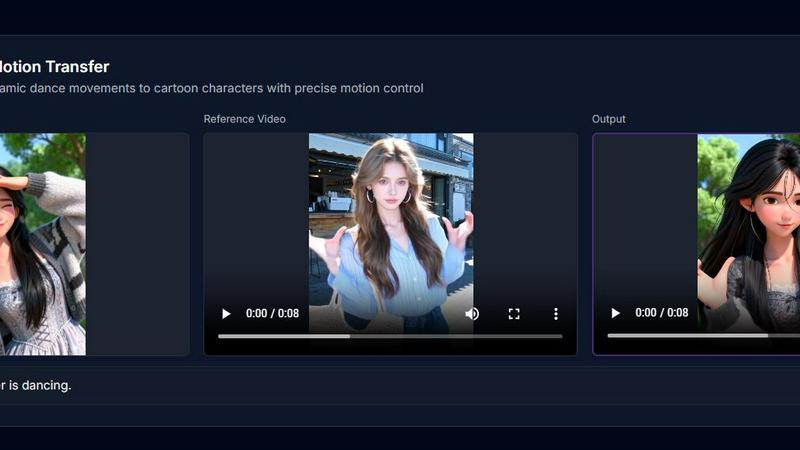
Kling Motion Control 3.0 brings your images to life with AI-powered, frame-accurate motion transfer from any video.
About Kling Motion Control 3.0
Welcome to the future of AI video creation! Kling Motion Control 3.0 is the groundbreaking, AI-driven motion control platform that empowers creative professionals to bring static images to life with breathtaking precision and cinematic flair. This isn't just animation; it's frame-accurate motion transfer. Simply upload a reference image of your character and a video of the desired movement, and watch as Kling's powerful AI engine seamlessly transfers complex motions—from energetic dances to subtle expressions—onto your subject. Designed for creators, marketers, filmmakers, and digital artists, it eliminates the need for expensive motion capture suits or complex 3D software. The core value proposition is unparalleled control: maintain perfect character consistency, direct specific motion trajectories, and achieve photorealistic results in high-definition 1080p. With the power of the advanced Kling Engine, you can now generate professional, dynamic video content in minutes, accelerating your workflow and unlocking a new dimension of creative storytelling. Join over 50,000 creators who are already generating cinematic videos daily and transform your static visions into moving masterpieces.
Features of Kling Motion Control 3.0
Precise Motion Trajectory Control
Go beyond random animation and take directorial command. This feature allows you to draw specific paths to guide your character's movement or control the camera flow with frame-by-frame accuracy. Ensure every pan, tilt, and zoom matches your exact creative vision, delivering professional-grade results that feel intentionally crafted, not randomly generated.
Superior Character & Scene Consistency
Maintain your subject's identity flawlessly throughout the entire video. Unlike older AI models that distort features, Kling Motion Control 3.0 ensures your character's face, attire, and defining details remain consistent from start to finish. This makes it perfect for serialized content and storytelling, where character integrity is paramount for audience connection.
Photorealistic Kling Engine Output
Experience the next leap in AI visual fidelity. Powered by the sophisticated Kling architecture, the platform generates high-definition 1080p videos with physically accurate lighting, fluid textures, and realistic physics. The output boasts a quality that rivals traditional CGI rendering, making your AI-generated videos look stunningly authentic and professional.
Complex Action & Expression Handling
Command intricate and dynamic movements with ease. The AI is expertly trained to interpret complex actions from your reference video, executing everything from full-body dance sequences to subtle facial expression changes and lip synchronization with exceptional accuracy and fluidity. It handles challenging motions that were previously difficult to achieve with AI.
Use Cases of Kling Motion Control 3.0
Dynamic Social Media & Marketing Content
Create eye-catching, viral-ready content for brands and influencers. Animate product photos, bring mascots to life, or transfer trendy dances to branded characters. This allows marketing teams to produce a high volume of engaging, personalized video ads and social posts quickly and cost-effectively, significantly boosting online engagement and campaign performance.
Independent Film & Animation Pre-Visualization
Revolutionize the pre-production process for indie filmmakers and animators. Quickly prototype character movements, choreograph action sequences, or visualize complex shots without a full animation team. This use case saves immense time and resources, allowing creators to experiment with motion and pacing before committing to final, more expensive production stages.
Personalized Digital Avatars & Content
Develop animated digital twins or personalized avatars for gaming, virtual meetings, or online education. Users can upload their own photo and a motion clip to create a custom avatar that mimics their gestures or a specific performance, opening doors for personalized entertainment, immersive remote communication, and unique digital identity creation.
Rapid Prototyping for Game Developers
Accelerate game development by generating fluid character animations for concept pitches, trailers, or indie games. Developers can use concept art as the reference image and actor footage as motion input to quickly produce high-quality animation tests, helping to secure funding, build hype, and iterate on character design and movement mechanics faster.
Frequently Asked Questions
What do I need to get started with Kling Motion Control 3.0?
You need just two things: a clear reference image (a portrait, character drawing, or product photo) and a short motion reference video. The platform will analyze the movement from your video and transfer it onto the subject in your image. You can further refine the result with optional text prompts to adjust scenes or details.
How does it maintain consistency better than other tools?
Kling Motion Control 3.0 is built on a next-generation AI architecture specifically designed to preserve subject identity. It understands and locks in core features like facial structure, hairstyle, and clothing from your reference image, ensuring these elements do not morph or degrade throughout the generated video, a common issue with earlier motion transfer models.
What kind of motion videos work best as a reference?
For optimal results, use clear, well-lit videos where the desired motion is the primary focus. The subject performing the motion should be easily distinguishable from the background. Dynamic actions like dances, martial arts, or expressive gestures work brilliantly. The more defined the motion in your reference, the more accurately it will be transferred.
Can I control the camera movement separately from the subject?
Yes! One of the standout features is cinematic camera control. Alongside transferring motion to your character, you can direct specific camera movements like pans, tilts, dollies, and zooms. This allows you to compose dynamic, professional shots that enhance the storytelling and production value of your final AI-generated video clip.