Caption.IM
Caption.im brings private real-time AI captions and translations to any audio on your Mac instantly.

About Caption.IM
Caption.IM is a groundbreaking, privacy-first AI captioning assistant built exclusively for macOS. It transforms any audio on your Mac into real-time captions, instant translations, and structured meeting notes, all processed locally on your device. Unlike browser extensions or intrusive meeting bots, Caption.IM captures system audio directly, making it compatible with virtually any application you use: Zoom, Google Meet, Microsoft Teams, YouTube, online courses, podcasts, livestreams, webinars, and even pre-recorded videos. This means you can generate live subtitles for conversations, translate multilingual content in real time, record important audio, and turn long discussions into clear summaries, key points, action items, and even mind maps. Built from the ground up with local AI and local LLMs in mind, Caption.IM ensures your conversations remain private and secure. There are no bots joining your meetings, no browser dependency, and no complicated setup. It is designed for remote workers, online learners, multilingual teams, content creators, researchers, and anyone who values accessibility and productivity. With an elegant, transparent floating subtitle window that integrates seamlessly with macOS, Caption.IM delivers a frictionless experience that feels like a native part of your operating system. It is optimized for Apple Silicon (M1, M2, M3, and later) to deliver ultra-fast speech recognition with minimal latency and efficient power usage. Turn any conversation into searchable, translatable knowledge instantly.
Features of Caption.IM
Real-Time Transcription
Caption.IM generates live captions for meetings, videos, podcasts, and calls with exceptional accuracy. The audio pipeline has been rebuilt with source-stage 16 kHz mono Float32 conversion, ensuring that every word is captured clearly and precisely. Whether you are in a fast-paced business meeting or watching a lecture, you can follow along with real-time text that appears on your screen, making it easier to stay engaged and never miss a critical detail.
Instant Translation
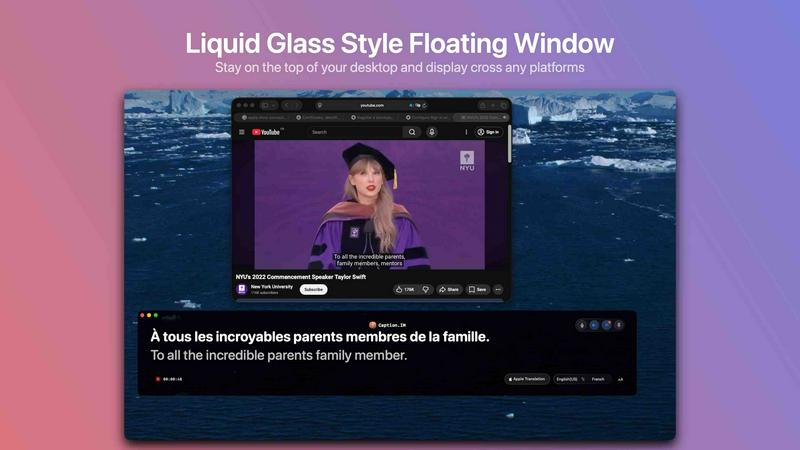
Break down language barriers effortlessly with real-time translated subtitles. Caption.IM supports multiple languages, allowing you to understand content from around the world as it is spoken. This feature is a game-changer for multilingual teams, international students, and global content consumers. You can watch a webinar in French and see English captions appear instantly, or participate in a meeting with colleagues from different countries without losing context.
Floating Subtitle Window
The elegant, transparent overlay is designed to work seamlessly with macOS. This floating subtitle window can be moved and resized to any position on your screen, ensuring it never obstructs your workflow. It is perfect for keeping captions visible while you take notes, browse the web, or work on other tasks. The design is minimal and unobtrusive, blending naturally into your desktop environment.
AI Meeting Summaries
After any conversation, Caption.IM automatically generates structured summaries and key insights. Instead of manually scrubbing through hours of recordings, you get concise summaries, action items, and even mind maps that capture the essence of your discussions. This feature saves hours of time for professionals who attend multiple meetings daily, ensuring that important decisions and follow-ups are never lost.
Use Cases of Caption.IM
Remote Meetings and Video Calls
For remote workers and teams using Zoom, Google Meet, or Microsoft Teams, Caption.IM provides live captions that make every meeting accessible and understandable. You can follow along even in noisy environments, capture action items automatically, and never worry about missing a key point. The AI summaries ensure you have a clear record of decisions and next steps, boosting team productivity and collaboration.
Online Learning and Courses
Students and lifelong learners can use Caption.IM to generate real-time subtitles for online courses, tutorials, and lectures from platforms like YouTube, Coursera, and Udemy. This is especially valuable for non-native speakers who need translated captions or for learners who prefer reading along to improve comprehension. Recorded sessions can be turned into searchable notes, making study and revision far more efficient.
Multilingual Teams and Global Collaboration
In today's globalized workplace, teams often include members speaking different languages. Caption.IM’s instant translation feature allows everyone to participate fully, regardless of their native language. Meetings become more inclusive, and misunderstandings are minimized. This is ideal for international companies, remote-first organizations, and any team that values clear communication across borders.
Content Creation and Research
Content creators, podcasters, and researchers can leverage Caption.IM to transcribe interviews, webinars, and live streams in real time. The generated captions can be used as rough drafts for show notes, blog posts, or research papers. The AI summaries and mind maps help structure ideas and identify key themes, streamlining the creative and analytical process. It is an indispensable tool for anyone who works with audio and video content.
Frequently Asked Questions
Does Caption.IM work with any app on my Mac?
Yes, Caption.IM captures system audio directly, which means it works with virtually any application that produces sound. This includes video conferencing tools like Zoom, Google Meet, and Microsoft Teams, as well as media players, web browsers, and recording software. There is no need for browser extensions or complex integrations.
Is my data private and secure?
Absolutely. Caption.IM is built with a privacy-first approach. All speech recognition and processing can run locally on your device using local AI and LLMs. Your conversations never leave your Mac, ensuring that sensitive information from meetings, personal calls, or research remains completely private. No bots join your meetings, and no data is sent to external servers.
What are the system requirements for Caption.IM?
Caption.IM requires macOS 15.6 or later and is optimized for Apple Silicon (M1, M2, M3, and later). The app is designed to deliver ultra-fast speech recognition with minimal latency and efficient power usage on these chips. It is a lightweight application, with a size of only 18.1 MB, making it easy to install and run without impacting system performance.
Can I use Caption.IM for free?
Caption.IM is available as a free download with in-app purchases. The free version provides core functionality, allowing you to experience real-time captions and basic features. For advanced capabilities like AI meeting summaries, mind maps, and extended recording, you can choose from optional subscription plans. Subscriptions automatically renew unless canceled at least 24 hours before the end of the current billing period.
Explore more in this category:
Top Alternatives to Caption.IM
Decker
Decker is the all-in-one operating system and monetization platform that helps consultants build, learn, belong, and earn from their deliverables.