xyOps
xyOps is the all-in-one workflow automation platform that orchestrates your entire infrastructure with scheduling, monitoring, and alerting built in.

About xyOps
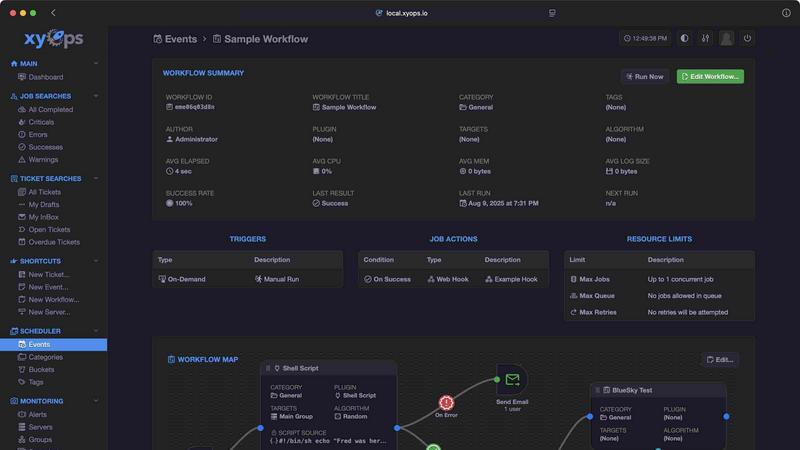
xyOps is a next-generation, open-source platform that unifies job scheduling, workflow automation, server monitoring, alerting, and incident response into one cohesive system. Built for developers and operations teams who demand full control over their automation stack, xyOps eliminates the need to stitch together disparate tools or surrender data to third-party telemetry. With xyOps, you schedule jobs across your entire fleet, track performance in real time, set smart alerts, and manage incidents all from a single interface. The platform features a visual workflow builder that lets you chain jobs with conditional logic, pass data between steps, and attach limiters like timeouts and memory caps. Its flexible job scheduler targets individual servers or groups, supports multiple schedules per event, blackout ranges, and even cron import. Active job tracking provides real-time progress updates, time remaining, and per-job resource limits. Server monitoring includes CPU, memory, network, disk, and log tracking with historical performance graphs. Smart alerts use trigger expressions with flexible rules, and can create tickets or run jobs automatically. An integrated ticketing system streamlines incident response, and the plugin architecture lets you write plugins in any language using a simple JSON over STDIO API. xyOps is BSD 3-Clause licensed, meaning it is 100% free and open source, with no hidden paywalls or restrictive licensing changes. It scales from five servers to five thousand, runs on macOS, Linux, and Windows, and supports hot backups for high availability. Whether you are a solo developer automating a personal project or a large team managing complex infrastructure, xyOps gives you the freedom, visibility, and extensibility to orchestrate your entire environment without compromise.
Features of xyOps
Visual Workflow Builder
The graphical workflow editor allows you to connect events, triggers, actions, and monitors into meaningful pipelines without writing code. Chain multiple jobs with conditional logic, pass data and even files between workflow steps, and assign actions like notifications or webhooks to specific events. Attach limiters such as timeouts, memory caps, and log size caps to prevent runaway processes. Run jobs in parallel or create custom queues for orderly execution, all while maintaining full visibility into the flow of your automation.
Flexible Job Scheduler
Go beyond traditional cron with a scheduler that targets individual servers or entire groups based on hostname patterns. Support multiple schedules per event, define blackout ranges for holidays or planned downtime, and import existing crontabs seamlessly. Schedule one-time jobs for single-shot tasks or recurring jobs with complex intervals. The plugin-based scheduler extensions allow you to customize scheduling logic to fit your unique infrastructure needs, giving you unprecedented flexibility in job timing.
Active Job Tracking
Run any number of jobs in parallel with the option to set a maximum parallel limit and automatically queue the rest. Track real-time progress updates including time remaining for each job, and enforce resource limits such as CPU and memory usage per job. Your jobs can emit their own progress and stats, allowing for granular monitoring. Run custom actions based on job results, such as triggering alerts or launching follow-up tasks, ensuring you never miss a critical event.
Smart Alerts and Integrated Ticketing
Define trigger expressions with flexible rules for sophisticated alerting logic. Receive notifications via email, webhook, or custom channels, with each alert including a snapshot of the server state at the time of the event. Alerts can automatically create tickets or launch jobs for automated incident response. Active alerts can even prevent new jobs from launching, providing a safety net during critical failures. The built-in ticketing system handles incident response end-to-end, with tickets that can attach files and run jobs for CI/CD integration, all fully scriptable via API.
Use Cases of xyOps
Infrastructure Automation and Job Scheduling
Operations teams managing fleets of servers can use xyOps to replace legacy cron systems with a modern, centralized scheduler. Schedule backups, maintenance scripts, and data processing jobs across hundreds or thousands of servers with one unified interface. Use blackout ranges to prevent jobs during holidays, and import existing crontabs to migrate legacy workflows without rewriting them. Real-time job tracking and per-job resource limits ensure that automation runs smoothly without overwhelming system resources.
Incident Response and Alerting
When a server goes down or a critical metric spikes, xyOps triggers smart alerts that include full server snapshots. These alerts can automatically create tickets in the integrated ticketing system, launch remedial jobs, or notify the on-call team via email or webhook. The ability to prevent new jobs from launching during active alerts adds a layer of protection against cascading failures. This use case is ideal for DevOps teams that need rapid, automated responses to infrastructure incidents.
CI/CD Pipeline Orchestration
Development teams can build complex CI/CD pipelines using the visual workflow builder. Chain build, test, and deployment jobs with conditional logic, passing artifacts and test results between steps. Attach timeouts to prevent stuck builds from consuming resources, and use parallel execution to speed up testing across multiple environments. Failed jobs automatically create tickets, and successful deployments can trigger monitoring alerts to validate the release. The plugin marketplace offers integrations with GitHub, Discord, Slack, and other tools commonly used in CI/CD workflows.
Custom Monitoring and Metrics Collection
Platform engineers can define custom monitors to track any metric relevant to their infrastructure. Run custom commands on servers to grab unique metrics, track CPU, memory, network, disk, and logs per job, and visualize historical performance graphs from hourly to yearly views. The plugin architecture allows writing custom monitors in any language, making it easy to integrate with existing monitoring tools or proprietary systems. This use case is perfect for organizations with specialized monitoring requirements that off-the-shelf tools cannot address.
Frequently Asked Questions
Is xyOps really free and open source?
Yes, xyOps is 100% free and open source under the BSD 3-Clause license. The license will never be modified, split, or amended with additional restrictive terms. No new code or contributions will ever be accepted under a non-OSI-approved license. All current and future app features will remain open source forever. Professional and enterprise support plans are available separately, but the core platform and all its features are completely free.
How does xyOps compare to traditional cron or commercial schedulers?
xyOps goes far beyond cron by providing a centralized scheduler that works across fleets of servers, with a visual workflow builder, real-time job tracking, resource limits, and smart alerts. Unlike commercial schedulers, xyOps does not hide features behind paywalls or push telemetry back to the vendor. It is fully extensible via plugins written in any language, and it includes built-in monitoring, alerting, and ticketing that would require multiple separate tools in other ecosystems.
Can I write plugins for xyOps in my preferred programming language?
Absolutely. xyOps uses a simple JSON over STDIO Plugin API that requires no SDK. All programming languages are supported as long as they can communicate via standard input/output. You can define custom parameters with UI form fields for easy configuration. Plugin types include Event, Action, Monitor, and Trigger, giving you complete flexibility to extend the platform. You can even add MCP servers as plugins and publish your creations to the Plugin Marketplace.
How does xyOps handle scalability and high availability?
xyOps is built to scale from five servers to five thousand. You can run multiple hot backups that automatically take over on power loss without interrupting any running jobs. The platform supports grouping servers manually or automatically based on hostname patterns, and agents can be easily installed on macOS, Linux, and Windows. Worker servers can be added to your cluster as needed, and the system handles failover seamlessly to ensure continuous operation.
Top Alternatives to xyOps
Tuning Engines
Tuning Engines is the unified, governed runtime that secures, optimizes, and streamlines every AI interaction through one API.
HyperLake
HyperLake is the sovereign AI factory that provisions governed, agentic infrastructure in your cloud with zero compute markup.
Minded
Minded lets you effortlessly build AI agents that handle tasks efficiently, transforming your workflow and delighting customers from day one.
TBC
TBC automates your LinkedIn posting with AI drafts, rich formatting, and scheduled publishing so you build your brand effortlessly.
Hyring
Hyring's AI recruiting platform helps you hire more humans by automating screenings, interviews, and candidate ranking.
InstantDM
InstantDM automates your Instagram DMs and comments, turning followers into customers effortlessly for just $9.99 a month.