Copilot 3D
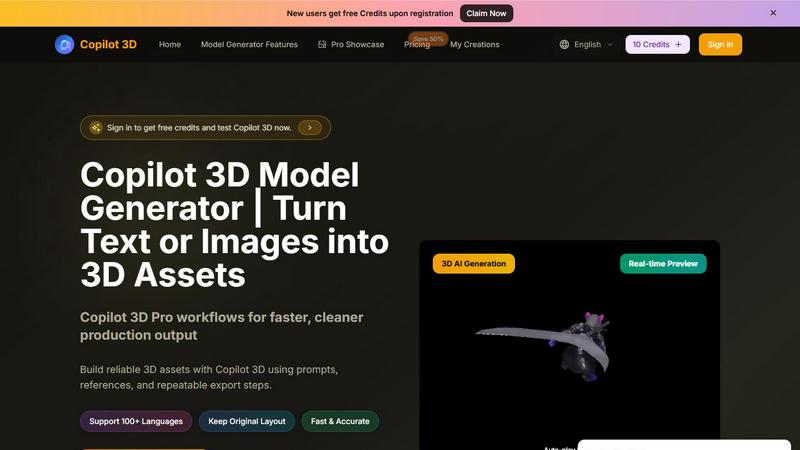
Copilot 3D instantly turns your text or images into production-ready 3D assets with fast, accurate AI generation and free credits for new users.

About Copilot 3D
Copilot 3D is a powerful AI 3D model generator built for creators and teams who need fast, reliable, and production-ready 3D assets. Whether you are a game developer, product designer, marketer, or content creator, Copilot 3D lets you turn simple text descriptions or reference images into fully realized 3D models in minutes. The platform supports both text-to-3D for open-ended concept exploration and image-to-3D for reference-driven generation, giving you total flexibility in how you start your projects. What sets Copilot 3D apart is its focus on practical output quality and a streamlined browser workflow that eliminates the need for complex software installations or steep learning curves. You can generate, preview, compare, and export your models all from one clean interface. New users get free credits upon registration, making it easy to test the tool on real projects without any upfront commitment. Copilot 3D supports over 100 languages, keeps your original layouts intact, and delivers fast, accurate results that teams can actually use for campaigns, games, product pages, and internal reviews. It is designed to balance creative freedom with repeatable, production-friendly processes so you can move from idea to delivery faster than ever.
Features of Copilot 3D
Text-to-3D Generation
Start with nothing more than a clear text description of the object, material, style, and lighting you want. Copilot 3D interprets your prompt and generates a clean first-pass 3D model that you can review and refine. This feature is perfect for early concept exploration when you need to visualize ideas quickly without any reference images.
Image-to-3D Generation
Upload a single image and let Copilot 3D transform it into a usable 3D model. Whether you are working from a concept sketch, a photo, or a digital reference, the image-to-3D workflow preserves composition and key details. This helps teams move from static references to interactive 3D assets that can be reviewed and shared with stakeholders.
360 Degree Preview
Before you commit to an export, you can preview your model from every angle using the full 360 view. This allows you to catch shape issues, surface inconsistencies, or detail problems early in the workflow. You can also quickly compare multiple generated versions side by side to pick the most polished result for your project.
Character Workflow
Generate character concepts in minutes by starting with a prompt or reference image, then refine the one that fits your vision. This feature is designed for teams working on games, campaigns, or social content who need to explore multiple character styles without starting from scratch each time. It dramatically speeds up the iteration loop for character design.
Use Cases of Copilot 3D
Game Development Asset Creation
Game developers can use Copilot 3D to quickly generate environment props, character concepts, and item models during the pre-production and prototyping phases. Instead of waiting days for a modeler to produce a first draft, teams can generate multiple options in minutes, compare them in a 360 view, and choose the best direction to hand off for final polish.
Product Design and Prototyping
Product teams can turn reference images or simple text descriptions into 3D product mockups for client presentations, internal reviews, or marketing materials. This allows designers to visualize how a product will look from all angles before investing in physical prototyping. The fast iteration loops mean you can explore variations in shape, material, and finish quickly.
Marketing and E-commerce Visuals
Marketers and e-commerce teams can generate 3D product visuals for campaign assets, social media content, and product pages without needing a dedicated 3D artist. By uploading a product image or describing the item in text, you can create multiple visual angles and styles that make your content more engaging and help customers understand the product better.
Concept Art and Storyboarding
Art directors and content creators can use Copilot 3D to generate 3D representations of scenes, characters, or objects described in scripts or briefs. This helps align creative teams around a shared visual direction before moving into full production. The ability to refine using natural language makes it easy to adjust mood, lighting, and materials without complex toolchains.
Frequently Asked Questions
Do I need prior 3D modeling experience to use Copilot 3D?
No, you do not need any prior 3D modeling experience. Copilot 3D is designed with a low learning curve so beginners can start generating models immediately. You simply describe what you want in text or upload a reference image, and the AI handles the heavy lifting. Advanced users still get enough control for serious work.
What file formats are supported for image uploads?
You can upload images in JPG, PNG, and WEBP formats. Each file must be under 5MB in size. If you do not have an image ready, you can also start from one of the provided sample images or use the text-to-3D feature to describe your model from scratch.
How does the free credits system work?
New users receive free credits upon registration, which allows you to test Copilot 3D on real projects without any upfront payment. You can sign in to claim your free credits and start generating models immediately. The credits are used each time you generate a 3D model, and you can always purchase more credits as needed.
Can I use Copilot 3D for commercial projects?
Yes, Copilot 3D is built for practical delivery and production use. Teams use it for game development, product design, marketing campaigns, and e-commerce visuals. The export files are designed to be clean and ready for downstream tools, making it suitable for commercial workflows and client deliverables.
Explore more in this category:
Top Alternatives to Copilot 3D
Cuto
Cuto turns your raw footage into polished, commercial-grade videos in 30 seconds with just one prompt and an editable AI edit plan.
Quote Image Maker
Turn any quote into a stunning social graphic instantly with AI that matches backgrounds to your words, no design skills required.
Ltx 2.5 AI Video Generator
Ltx 2.5 turns your text or images into stunning, controllable AI videos in seconds, ready to share.
VO4 AI
Create stunning viral videos in minutes from text or images with VO4 AI's powerful and intuitive video generation technology.

EsyBlog
EsyBlog transforms any dataset into editorial-grade articles that sound human, helping serious SEO teams publish a thousand pieces in a single.