
ProcessSpy
ProcessSpy is the ultimate Mac monitor that empowers you to track and analyze processes with advanced features for unmatched system insight.
About ProcessSpy
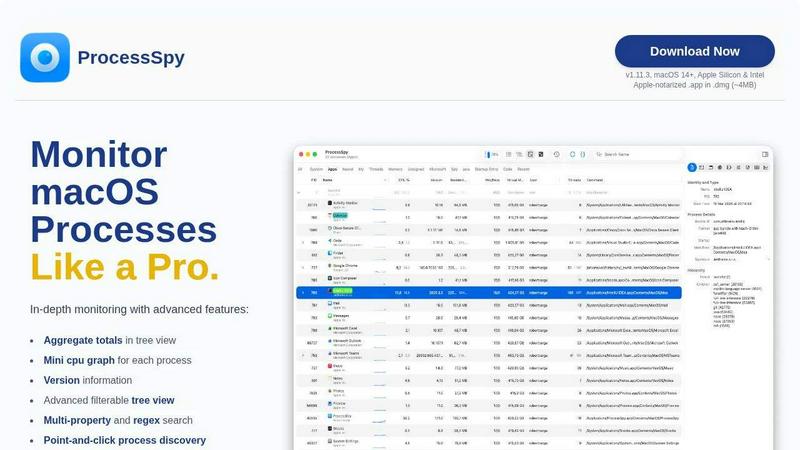
ProcessSpy is a powerful macOS Process Explorer designed to provide an in-depth view of all the processes running on your Mac, far beyond what Activity Monitor can show. Targeted at developers and power users, this advanced tool allows you to visualize process trees, inspect open files, and view environment variables, giving you an unparalleled level of control and insight. With features like the ability to kill stubborn apps instantly, aggregate totals for CPU, Memory, and Threads, and advanced JavaScript filters, ProcessSpy revolutionizes the way you monitor and manage macOS processes. It is designed with a Mac-first philosophy, utilizing native APIs to ensure smooth performance and tight integration into the macOS environment. Whether you are troubleshooting applications, optimizing performance, or just curious about what is running on your machine, ProcessSpy is your go-to solution for comprehensive process monitoring.
Features of ProcessSpy
Advanced Tree View
ProcessSpy's advanced tree view provides a detailed representation of running processes, allowing users to visualize how processes are related hierarchically. This feature enhances your ability to troubleshoot and optimize performance by showing aggregate totals for CPU, Memory, and Threads right at your fingertips.
JavaScript Filters
With the capability to create complex filters using JavaScript, ProcessSpy empowers users to define multi-condition filters tailored to their specific needs. This advanced feature allows for fine-tuned searches, enabling you to quickly find the exact process you need to monitor or troubleshoot.
Environment Variables (Paid Feature)
Unlock deeper insights into your processes with the ability to view environment variables. This feature, available through a paid license, is invaluable for developers trying to understand the context in which their applications are running, making it easier to diagnose issues or optimize configurations.
Process History Recording (Paid Feature)
Keep track of your processes over time with the history recording feature, which logs historical values for CPU, Memory, and Threads. This allows users to analyze trends and performance changes, and the results can be exported to CSV for further analysis or reporting.
Use Cases of ProcessSpy
Developer Debugging
Developers can leverage ProcessSpy to debug applications efficiently by accessing detailed command-line information and version details. This allows for quick identification of issues related to specific JDK versions or dependencies that can otherwise be hidden in traditional monitors.
Performance Optimization
System administrators and performance engineers can utilize ProcessSpy to monitor application performance and resource usage in real-time. With aggregate metrics and advanced filters, they can pinpoint resource hogs and optimize system performance effectively.
Security Auditing
Security analysts can use ProcessSpy to inspect running processes for suspicious activity. The ability to view environment variables and command-line arguments helps in identifying potentially malicious processes and understanding their context.
Educational Purposes
Students and new Mac users can benefit from ProcessSpy as a learning tool to understand how processes operate on macOS. By visualizing process trees and exploring open files, they can gain a foundational knowledge of operating system concepts and process management.
Frequently Asked Questions
Is ProcessSpy safe to install on my Mac?
Yes. ProcessSpy is Apple-notarized and distributed as a signed .app within a .dmg file. It is verified and safe to use on both Intel and Apple Silicon Macs, ensuring your machine's security.
Does ProcessSpy support older versions of macOS?
No, ProcessSpy is specifically designed for macOS 14 and newer. Users with older versions will need to upgrade their operating systems to utilize this tool effectively.
What is the license model for ProcessSpy?
The license for ProcessSpy is valid for one user across unlimited devices, providing lifetime updates and new features. This ensures you always have access to the latest enhancements without additional costs.
Can I export data from ProcessSpy?
Yes, ProcessSpy allows users to export process data, including historical values for CPU, Memory, and Threads, to CSV format. This feature is particularly useful for analysis and reporting purposes.
Top Alternatives to ProcessSpy



Use AI Tools
Discover, compare, and choose from 135+ handpicked AI tools across writing, image, and more, updated weekly.


Game Server Backend
Game Server Backend simplifies multiplayer development with integrated player auth, data storage, and matchmaking on one powerful platform.

Veed Crawl
Turn any public social video URL into transcripts, metadata, and structured insights for your AI agents.
Headless Domains
Empower your AI agent with a secure, verifiable identity through Headless Domains to enhance trust across digital platforms.